Large language models (LLMs) with multimodal capabilities grow stronger in 2026 as artificial intelligence keeps developing at a high pace. In response to the rising demand for completely intelligent, multimodal, and developer-friendly AI systems, Google has made major advances with Gemini AI, while OpenAI’s ChatGPT and Anthropic’s Claude have largely led the market.
Gemini, built by Google DeepMind, is not merely an update to Bard. It represents a shift in how AI interprets, communicates with, and contributes to a wide range of content types, including text, code, images, audio, and video.
So, what makes Gemini different? How can developers use it to build smarter apps? Let’s look at everything you need to know about Google Gemini AI in 2026.
What is Google Gemini AI?
Google Gemini AI is a family of advanced multimodal AI models created by Google DeepMind to compete with other industry leaders like GPT-4.5, Claude 3, and Perplexity AI. It is an upgrade of Google’s Bard chatbot and is deeply integrated with Google’s ecosystem, which includes Android, Google Cloud AI Studio, and Google Workspace (Docs, Gmail, and Sheets).
Gemini is unique because it is natively multimodal, which means that it was built from the base to understand and generate data of different types beyond just text. Gemini is capable of writing code, analyzing charts, interpreting images, summarizing legal documents, and generating audio subtitles.
Different Google Gemini Models Available in 2026
- Gemini 3 Pro: Gemini 3 Pro is the latest flagship reasoning model as of February 2026, offering improved long-context understanding, advanced coding capabilities, and enhanced multimodal reasoning.
- Gemini 3 Flash: A low-latency, cost-efficient model optimized for real-time applications, chat interfaces, and API-based deployments. It balances speed and performance, making it ideal for production-grade apps.
- Gemini 3 DeepThink: Designed for complex mathematical, scientific, and enterprise-grade reasoning tasks. It is optimized for structured problem-solving and multi-step analytical workflows.
- Gemini Nano: A lightweight, on-device model built for Pixel and Android devices. It supports offline AI use cases and privacy-first deployments through on-device inference.
- Gemini API (via Vertex AI): Provides developers with strong backend support through Google Cloud’s Vertex AI, enabling scalable deployment from prototype to enterprise environments.
Key Features of Google Gemini AI in 2026
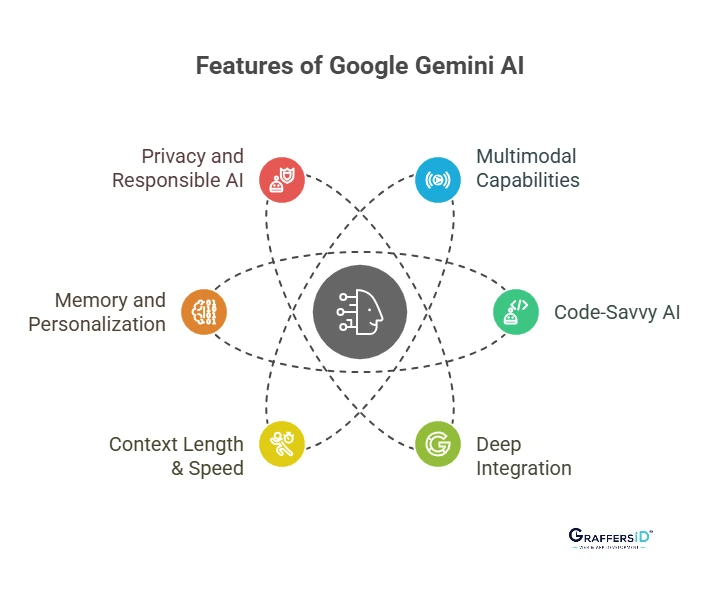
1. Native Multimodal Capabilities
As Gemini natively supports a variety of data types, it can manage:
- Text: Write blogs, summarize research papers, translate texts, and create technical content drafts.
- Code: Write, debug, or refactor code by understanding logic, syntax, and architecture.
- Images: Analyze diagrams, screenshots, and images for contextual understanding.
- Audio: Translate voice input, generate subtitles, and process verbal instructions.
- Video: Recognize key frames, understand timelines, and extract insights from visual narratives.
Gemini 3 models introduce Agentic Vision, enabling active exploration of visual inputs instead of passive interpretation. This reduces hallucinations and improves accuracy when analyzing diagrams, dashboards, screenshots, and complex visual workflows, which is especially useful in debugging UI layouts or reviewing analytics charts.
2. Code-Savvy AI
Gemini is excellent at helping developers by:
- Providing Syntax Suggestions: Correct syntax across multiple languages.
- Code Completion & Refactoring: Improve readability and performance.
- Documentation Generation: Automatically generate internal documentation.
- Version Migration: Assist in migrating codebases (e.g., Python upgrades, AngularJS to React).
- Unit Testing: Suggest and generate unit tests to reduce manual QA time.
- Repository Understanding: With expanded context windows (1M+ tokens), Gemini can analyze large repositories in a single prompt.
3. Deep Integration with Google Ecosystem
Gemini can be easily integrated with:
- Google Docs & Gmail: Writing, summarization, translation.
- Google Sheets: Data analysis, formula generation, and visualization suggestions.
- Search Engine Results (AI Mode): AI-augmented search responses powered by Gemini.
- Android Development: Assistance inside Android Studio with on-device AI capabilities.
- NotebookLM: Now powered by Gemini 3, improving research reasoning and multimodal summarization workflows.
In 2026, Gemini is set to replace Google Assistant as the default AI assistant on Android devices. This marks a major shift toward AI-native mobile interfaces, allowing deeper contextual awareness and system-level integration.
4. Context Length & Speed
Gemini 3 continues supporting extremely large context windows:
- 1M+ Tokens: Review and compare hundreds of pages simultaneously.
- Complex Codebases: Understand entire repositories quickly.
- Real-Time Speed: Gemini 3 Flash delivers low-latency responses optimized for live applications and API usage.
5. Memory and Personalization
Gemini’s evolving memory system helps it:
- Remember Previous Sessions: Recall the last session’s remarks.
- Learn Developer Preferences: Understands your object-oriented or functional code preference.
- Adapt Suggestions to Prior Interactions: Adjusts its tone and suggestions depending on previous conversations.
Gemini can securely connect with Google apps such as Gmail, Drive, Photos, and Calendar to provide highly contextual and personalized responses. This enables smarter automation workflows and assistant-like behavior beyond isolated prompts.
Read More: Claude vs. Gemini: Which LLM is Better for IT Workflows Like Coding and Automation in 2026?
6. Privacy and Responsible AI
Google ensures:
- Federated Learning: On-device data processing for Gemini Nano.
- Granular Permission Settings: User-controlled data access.
- Bias & Toxicity Mitigation: AI audits and fairness evaluations.
- Enterprise-Grade Compliance Controls: Secure deployment via Vertex AI.
Technical Use Cases of Google Gemini AI for Developers in 2026
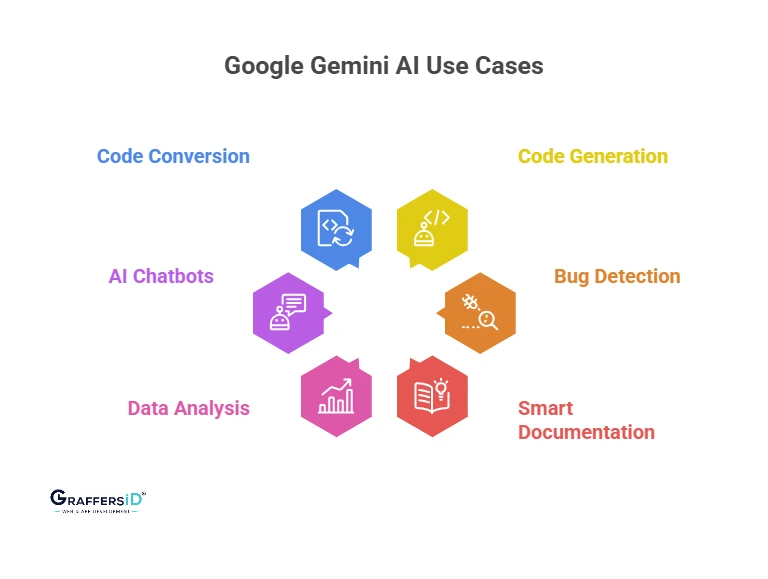
- Automated Code Generation: Give a clear description of your application’s functionality, and Gemini will develop the REST APIs, UI components, and frontend/backend stack logic from clear product requirements.
- Bug Detection and Fixing: Identify logical, syntactic, or runtime errors in codebases. Gemini not only highlights the error but also explains the root cause and suggests possible fixes.
- Smart Documentation: Generates human-readable documentation directly from the code. Helps create API documentation, change logs, and technical specifications.
- Data Analysis: Using natural language queries, ask Gemini to create trends, patterns, or dashboards from data imported from Excel, CSV, or SQL.
- AI-Powered Chatbots & Assistants: Developers can create multimodal bots that work with internal tools, CRM systems, and customer support by using voice, image, or text.
- Code Conversion: Migrate legacy stacks (like VBScript or jQuery) to more modern stacks like React, Node.js, or GoLang.
- Interactive Search Applications: Combine Gemini reasoning with search-based retrieval for dynamic AI-driven product experiences.
- Vision-Based Debugging: Use Agentic Vision to interpret UI screenshots, error states, and product flows visually.
Read More: AI Assistants vs. AI Agents (2026): Key Differences, Features, and Use Cases Explained
Benefits of Google Gemini AI for Developers in 2026
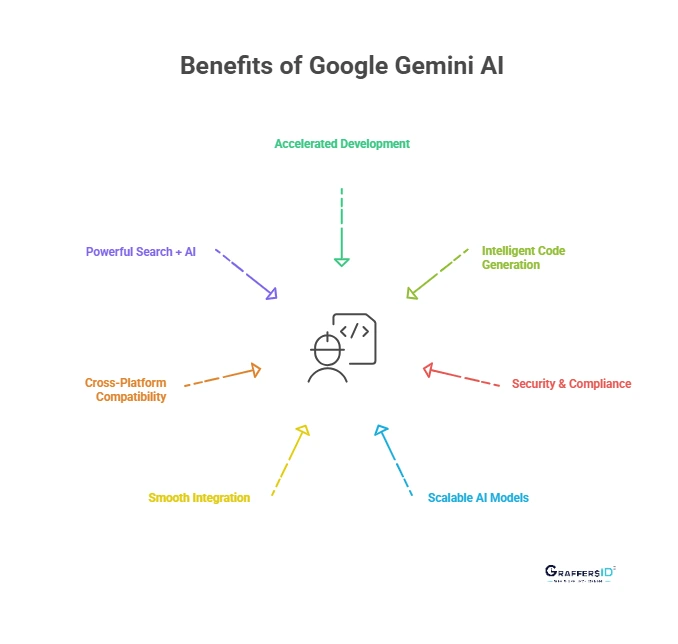
- Accelerated Development: By automating UI design, API scaffolding, and repetitive development tasks, Gemini greatly reduces deployment time. This speeds up iteration cycles and MVP launches, which is essential for agile teams and companies.
- Intelligent Code Generation: Gemini comprehends intent, context, and design patterns as compared to rule-based systems. It improves the overall quality of software by generating clear, effective, and modular code and adheres to industry best practices.
- Security & Compliance: Gemini conducts real-time security analysis on code, identifying deprecated procedures, insecure libraries, and incorrect logic. It guarantees adherence to laws governing data management, such as HIPAA and GDPR.
- Scalable AI Deployment: Developers can start with small tasks and gradually scale AI-powered features across their applications. Gemini’s integration with Vertex AI allows seamless transition from prototypes to enterprise-level deployments.
- Smooth Integration: Gemini has native integration with Google’s toolkit. Without requiring additional setup, developers may work in familiar areas while helping with debugging Android apps in Studio or suggesting formulas in Sheets.
- Cross-Platform Compatibility: Gemini can be used for cloud backends, mobile, web, or edge devices. Developers have unparalleled flexibility with the Gemini API for cloud scalability and Gemini Nano for local inference.
- Powerful Search + AI: Gemini integrates AI understanding with Google’s vast search index. Developers may refer to Stack Overflow threads, libraries, and documentation while they are coding.
- Low-Latency AI at Scale: Gemini 3 Flash enables cost-efficient, real-time AI features in production apps.
Gemini vs. Other AI Models (GPT-4, Claude, Perplexity): Quick Comparison 2026
| Feature | Google Gemini | GPT | Claude | Perplexity |
|---|---|---|---|---|
| Multimodal | Native | Partial | Yes | Yes |
| Context Length | 1M+ tokens | 128K+ | 200K | 100K |
| Ecosystem Support | Deep (Google) | Strong (OpenAI) | AWS + Claude | Search-centric |
| Developer Focus | High | High | Medium | Low |
| Memory/Personalization | Yes | Yes | Yes | No |
| On-Device AI | Yes (Nano) | Limited | No | No |
How to Use Google Gemini AI in 2026: Step-by-Step Setup & Integration Guide
If you’re wondering “How do I integrate Google Gemini into my app?” or “How to set up Gemini API in 2026?”, follow this practical step-by-step process used by developers and enterprises.
This process works for startups, SaaS platforms, Android apps, and enterprise AI automation systems.
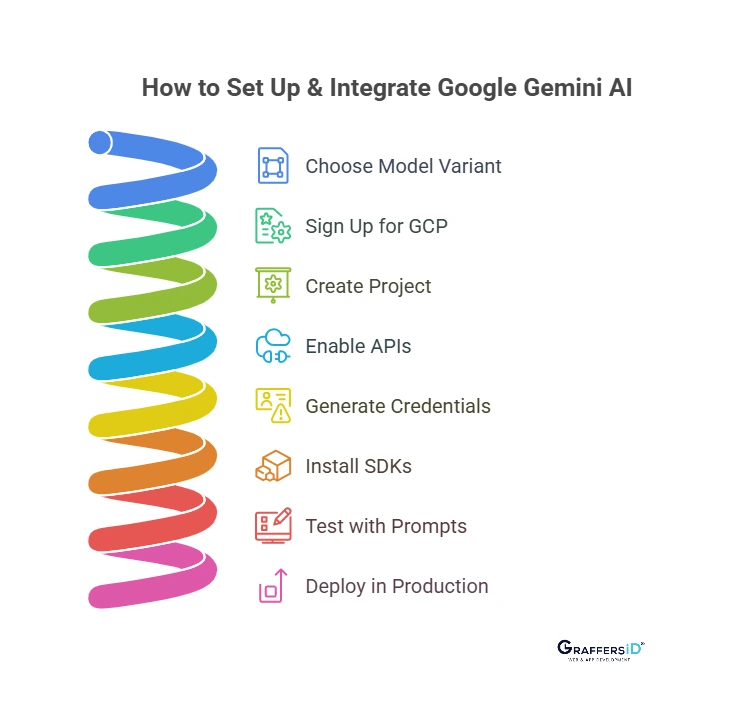
Step 1: Choose the Right Gemini Model
Before integration, select the model based on your use case:
-
Gemini 3 Flash: Best for real-time applications, chatbots, and production-grade AI features (low latency + cost efficient).
-
Gemini 3 Pro: Ideal for advanced reasoning, long documents, and complex code generation.
-
Gemini Nano: Used for on-device AI in Android apps (offline + privacy-focused).
-
Gemini API via Vertex AI: Recommended for scalable backend integrations.
Step 2: Create a New Account or Sign-in to Google Cloud or Gemini
To access the Gemini API:
- Go to Google Cloud Platform (GCP) or to https://gemini.google.com/
- Create or sign in to your account.
- Enable billing (required for API usage).
- Set up organization-level permissions if you’re integrating for an enterprise.
For production apps, use a secure organization-level cloud setup instead of personal credentials.
Step 3: Create a New Project in Google Cloud Console
Inside the GCP dashboard:
- Click Create Project
- Assign a project name
- Configure billing account
- Set IAM roles (Admin, Developer, Security access)
Projects help manage quotas, costs, logs, and API access separately for staging and production environments.
Step 4: Enable Vertex AI & Gemini API
Next:
- Navigate to APIs & Services
- Search for Vertex AI
- Enable the Gemini API under Vertex AI models
- Configure usage quotas
- Review regional availability for deployment
Vertex AI acts as the deployment layer for Gemini in enterprise-grade environments.
Step 5: Generate Secure API Credentials
To authenticate requests:
- Create an API key for testing
- For production, use OAuth 2.0 or Service Accounts
- Store credentials in secure environment variables (never hardcode them)
Enterprise best practice: Use IAM-based access controls with minimal permissions.
Step 6: Install the Gemini SDK
Google provides SDKs for:
- Python
- Node.js
- REST API
- Java (enterprise use cases)
Example workflow:
- Install SDK via package manager
- Configure authentication
- Initialize the Gemini model
- Send a prompt request
- Handle response
In 2026, most backend systems integrate Gemini into microservices or AI orchestration layers.
Step 7: Test with Sample Prompts
Before deploying:
- Test text generation
- Run code generation prompts
- Try multimodal inputs (images, documents)
- Monitor latency and cost usage
Use logging tools in Vertex AI to measure:
- Token consumption
- Response time
- Error rates
Testing ensures stability before live deployment.
Step 8: Deploy to Production
Once validated:
- Integrate Gemini into your backend APIs
- Connect with frontend applications
- Set rate limits
- Implement fallback logic
- Monitor performance with Cloud Monitoring
For enterprise AI systems, combine Gemini with:
- Internal databases
- Search indexing
- CRM tools
- Workflow automation platforms
This creates scalable AI-powered applications.
Best Practices for Gemini Integration in 2026
To future-proof your AI deployment:
- Use Gemini 3 Flash for real-time apps
- Optimize prompts for token efficiency
- Enable logging & observability
- Secure credentials with IAM policies
- Monitor API costs regularly
- Combine Gemini with retrieval systems for higher accuracy

Conclusion
Google Gemini AI is not just a basic chatbot or virtual assistant. It is a feature-rich, developer-focused multimodal AI system that integrates deeply into mobile, cloud, and enterprise environments. With the introduction of Gemini 3 Pro, Flash, and DeepThink, along with Agentic Vision and Personal Intelligence, Gemini represents a major step toward AI-native software development in 2026.
By understanding context, processing multiple input formats, and generating intelligent outputs at scale, Gemini is reshaping how developers build modern applications.
At GraffersID, our skilled developers help startups and enterprises to build cutting-edge solutions using AI automation, web platforms, and mobile applications. Partner with us to build high-performance, scalable digital products powered by the latest AI advancements.