In 2026, the real challenge for tech-enabled companies is no longer adopting AI. It’s making AI work reliably when the business starts to scale.
Across product teams, marketing, sales, and operations, AI is everywhere. Teams are experimenting with ChatGPT, internal models, automation platforms, and AI agents. On paper, each workflow looks impressive. Demos work. Pilot results look promising. Then reality hits.
As volume increases and systems begin interacting with each other, cracks appear. Leads slip through disconnected workflows. Customer queries get inconsistent answers across channels. Teams spend more time managing AI outputs than benefiting from them. Instead of accelerating growth, AI begins to create friction.
This is not a tooling problem. It’s a coordination problem. And this is exactly where AI orchestration becomes critical.
AI orchestration isn’t about adding more models or switching platforms. It’s about intentionally designing how multiple AI systems, data sources, and workflows operate together, with clear logic, safeguards, accountability, and business alignment built in.
In this guide, we break down what AI orchestration means, how it works, practical use cases, and how businesses can implement AI orchestration as a dependable and scalable capability.
What is AI Orchestration?
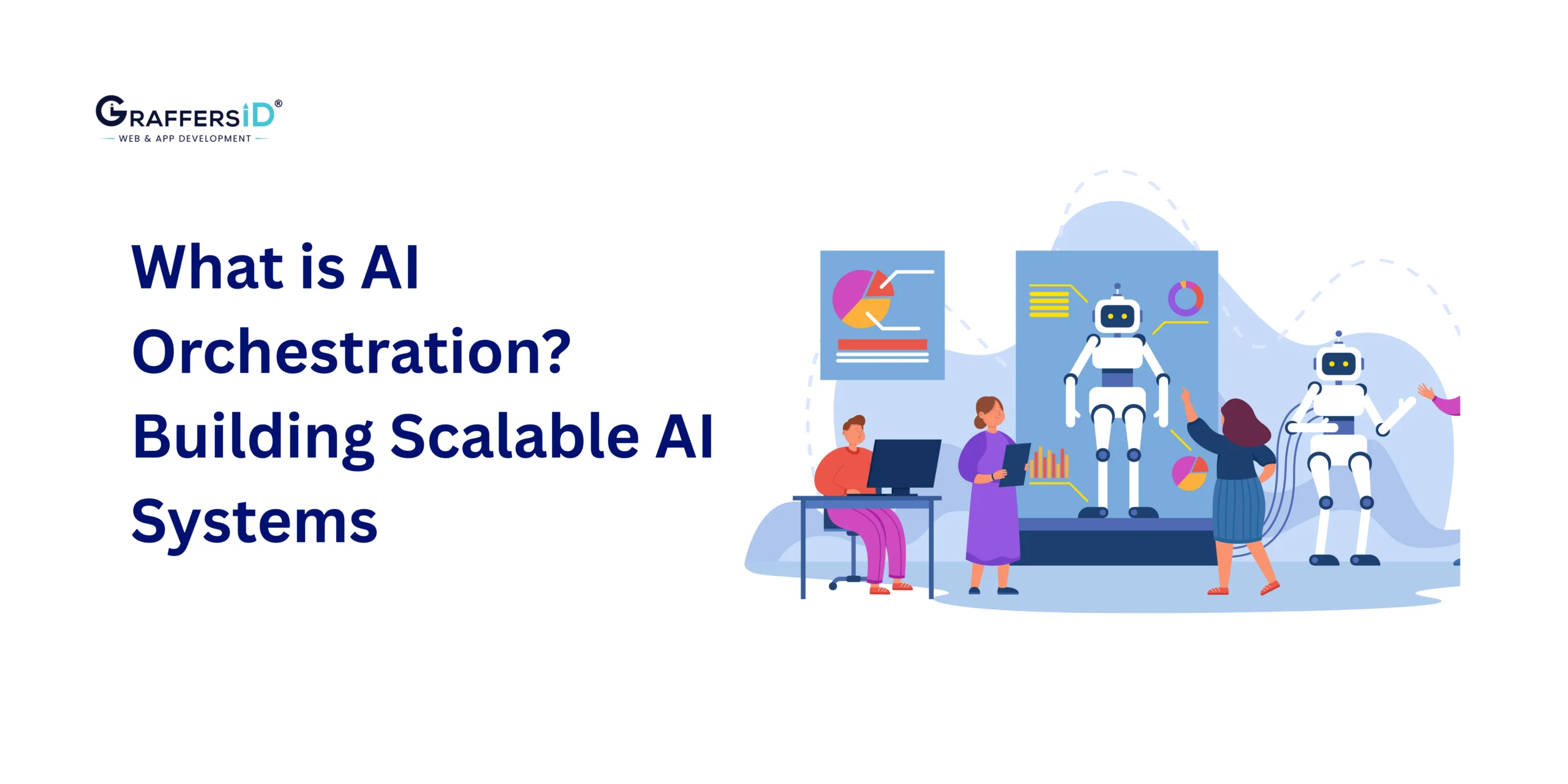
AI orchestration is the practice of coordinating multiple AI models, tools, workflows, and data systems so they operate together as one intelligent, reliable system.
Instead of running AI in isolated automations, where each model or tool works independently, AI orchestration connects these components into unified decision flows that support real business operations.
In practical business environments, orchestration focuses on governance, sequencing, and control rather than individual AI capabilities. It defines how different AI systems interact, how outputs are validated, and how decisions move across teams and platforms in a predictable way.
Read More: What Are Multi-Agent Systems in 2026? Architecture, Benefits, and Real-World Applications
At a practical level, AI orchestration helps organizations answer critical questions such as:
-
Which AI model or agent should be triggered first for a specific task?
-
What happens when an AI model fails or produces low-confidence output?
-
When should a human decision-maker step in?
-
How does data move securely across tools, platforms, and departments?
-
How are AI decisions tracked, monitored, and improved over time?
AI Orchestration vs. Automation and AI Agents (Quick Comparison)
| Aspect | AI Automation | AI Agents | AI Orchestration |
|---|---|---|---|
| Primary role | Execute predefined tasks | Act autonomously | Coordinate systems and decisions |
| Level of autonomy | Low | High | Controlled and contextual |
| Scope | Single workflow | Individual agent | Cross-system workflows |
| Handles failures | Limited | Unpredictable | Built-in fallback logic |
| Output consistency | High (static rules) | Variable | High (governed logic) |
| Business alignment | Narrow | Medium | Strong |
| Required for scale | No | Partial | Yes |
Core Components of an AI Orchestration System in 2026
Below are the core components we see consistently in scalable, production-grade AI orchestration setups.
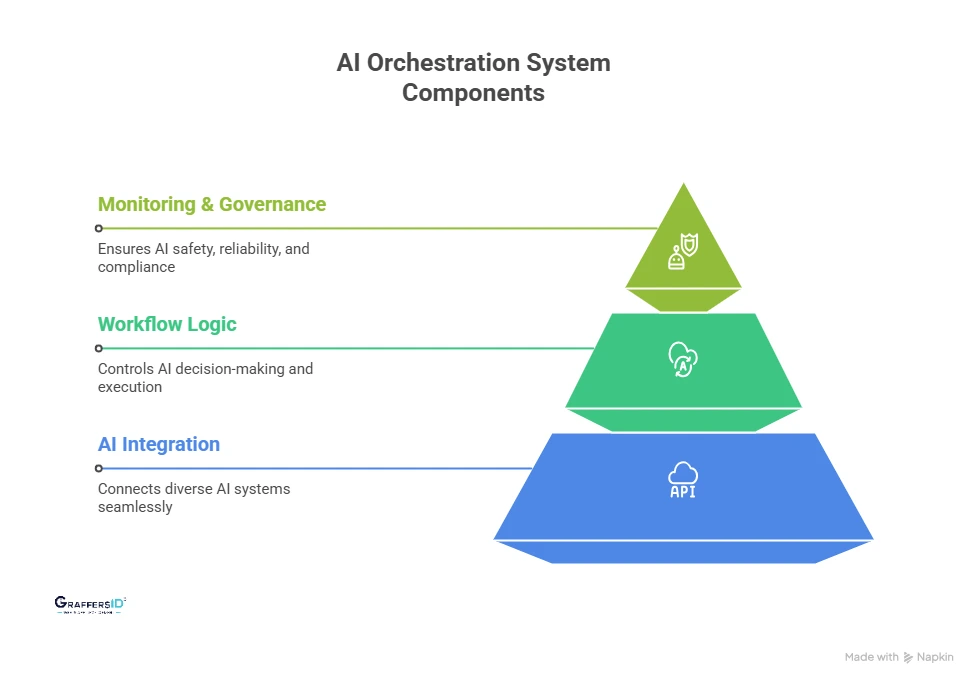
1. AI Integration Layer (Connecting All AI Systems)
The AI integration layer is responsible for making different AI systems work together without breaking. It connects:
-
Large language models (public or private)
-
Custom machine learning models
-
Third-party APIs and SaaS tools
-
Internal systems, databases, and business applications
In practice, most AI initiatives stall not because models are weak, but because integrations become fragile at scale.
2. Workflow and Decision Logic (Controlling How AI Makes Decisions)
This layer defines how and when AI systems are triggered and what happens next. It controls:
-
Execution order between models and tools
-
Conditional branching based on AI output
-
Error handling and fallback workflows
-
Confidence thresholds that decide when to escalate to humans
AI outputs are probabilistic by nature. AI orchestration adds determinism, rules, and predictability where businesses need consistency and control.
Read More: Best Automation Software in 2026: Top Platforms to Streamline Workflows & Boost Efficiency
3. Monitoring, Governance, and Control (Keeping AI Safe and Reliable)
This layer ensures AI systems remain trustworthy, auditable, and compliant in production. It typically includes:
-
End-to-end logging and traceability of AI decisions
-
Role-based access controls and permissions
-
Audit-ready workflows for compliance reviews
-
Performance and reliability monitoring across workflows
Without proper monitoring and governance, AI quickly becomes a compliance, security, and operational risk, especially as more teams and systems depend on it.
Why Businesses Are Using AI Orchestration in 2026?
Below are the benefits of using AI Orchestration in your workflows:
1. Operational Scalability Across Teams and Workflows
As AI usage grows, isolated automations stop scaling. AI orchestration helps businesses:
-
Run AI workflows reliably at higher volumes without performance drops
-
Support multiple teams and departments using shared AI systems
-
Extend or modify workflows without rebuilding logic from scratch
2. Better Cost Control for AI Models and Infrastructure
Uncoordinated AI usage quickly drives up costs. With orchestration, companies can:
-
Route tasks to the most cost-effective model based on complexity
-
Avoid running expensive models when simpler ones are sufficient
-
Reduce duplicate AI calls across overlapping workflows
3. Consistent and Reliable AI-Driven Decisions
When multiple AI models operate independently, outputs often conflict. AI orchestration:
-
Enforces shared business rules across all AI workflows
-
Ensures consistent responses across channels and systems
-
Reduces decision variability caused by isolated AI tools
4. Stronger Governance, Compliance, and Trust
As AI influences real business outcomes, oversight becomes critical. Orchestrated AI systems allow decision-makers to:
-
Understand why an AI decision was made
-
Trace outputs back to data sources and models
-
Apply approval layers, audit logs, and risk controls
How AI Orchestration Works in Real Business Systems in 2026?
In production environments, AI orchestration acts as the control layer that connects events, AI models, data, and decisions. Instead of letting AI tools operate independently, orchestration ensures every step follows a defined, reliable flow. In practice, a typical AI orchestration workflow looks like this:
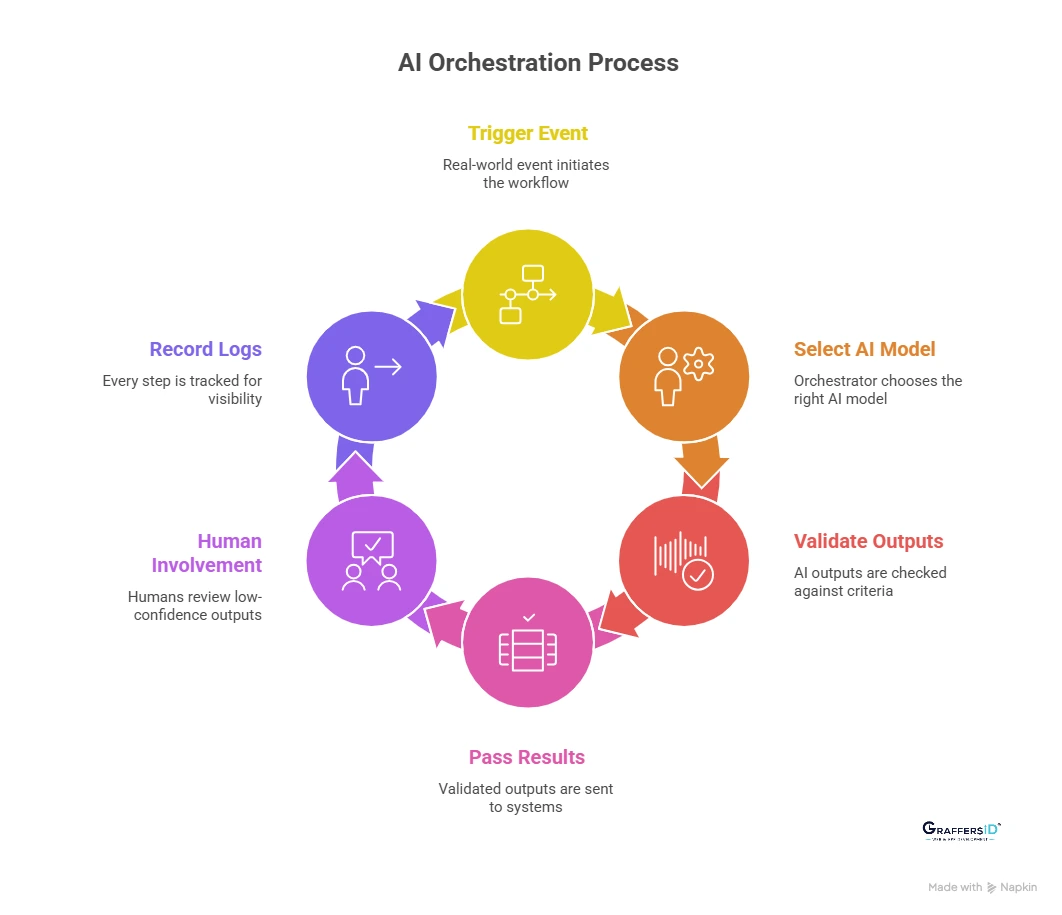
1. A Business Event Triggers the Workflow
An orchestration flow begins with a real-world event, such as:
-
A user action on a website or app
-
An API request from another system
-
A data update in a CRM, ERP, or internal tool
This ensures AI runs in response to business needs, not in isolation.
2. The Orchestrator Selects the Right AI Model
Rather than calling a single model every time, the orchestrator:
-
Chooses models based on task complexity, cost, or latency
-
Routes simple tasks to lightweight models
-
Escalates complex cases to more advanced AI systems
This keeps workflows efficient and cost-controlled.
3. AI Outputs Are Validated and Checked
AI-generated outputs are never assumed to be correct by default. Orchestration applies:
-
Business rules and constraints
-
Confidence thresholds and quality checks
-
Policy and compliance validations
If results don’t meet defined criteria, the workflow adjusts automatically.
4. Results Are Passed Across Systems and Workflows
Validated outputs are then:
-
Sent to downstream systems (CRM, support tools, databases)
-
Used as inputs for additional AI models or agents
-
Combined with structured data for final decisions
This enables smooth handoffs across tools and teams.
5. Humans Are Involved Only When Needed
Orchestration introduces human oversight where it matters most. For example:
-
Low-confidence outputs trigger manual review
-
High-risk decisions require approval
-
Edge cases are escalated to experts
This balances automation with accountability.
6. Logs, Metrics, and Decisions Are Recorded Automatically
Every step in the orchestration flow is tracked. This provides:
-
Full visibility into how decisions were made
-
Performance and cost metrics for optimization
-
Audit trails for compliance and governance
Use Cases of AI Orchestration in Production Systems
1. Customer Support at Scale
In production environments, AI orchestration coordinates intent detection, sentiment analysis, and response generation across multiple models, escalating only complex or high-risk cases to human agents. This delivers faster resolutions while maintaining consistent customer support quality across channels.
2. Sales and Lead Management
AI orchestration enables leads to be enriched, scored, and prioritized using multiple data sources and decision rules, then automatically routed to the right sales teams. This replaces fragmented CRM workflows and reduces manual handoffs that slow revenue teams down.
3. Internal IT and HR Operations
For internal support, AI orchestration powers automated ticket triage, accurate knowledge retrieval, and policy-aware responses, with secure handoffs between systems. These high-volume workflows benefit most from orchestration, delivering measurable efficiency gains and quick ROI.
How to Implement AI Orchestration in 2026? Step-by-Step Guide
Based on what consistently works in real production environments, this phased approach helps companies move from AI experiments to reliable, scalable systems.
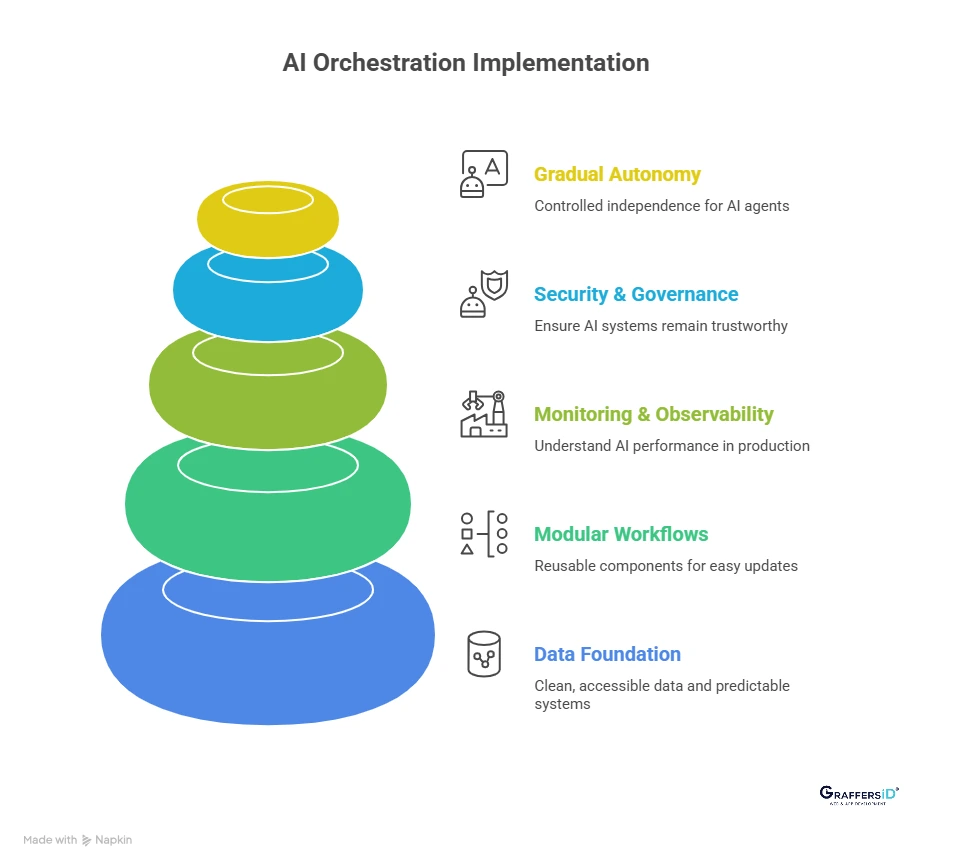
1. Build a Strong Data and System Foundation
AI orchestration depends on clean, accessible data and predictable systems. Ensure data sources are well-governed, APIs are standardized, and ownership of each system is clearly defined to avoid workflow breakdowns at scale. Skipping this step almost always leads to orchestration failures later.
2. Design Modular and Reusable AI Workflows
Avoid building large, tightly coupled AI systems that are hard to change or debug. Modular workflows allow individual components to be updated, replaced, or scaled without disrupting the entire system. Modularity is what allows AI systems to scale safely over time.
Read More: Agentic AI vs. AI Agents: Key Differences, Real-World Examples, and Business Use Cases (2026 Guide)
3. Add Monitoring and Observability From Day One
AI systems behave differently under real-world load than in demos.
Observability helps teams understand what’s working, what’s failing, and why. If you can’t measure AI performance in production, you can’t improve or scale it.
4. Secure and Govern AI Workflows at Every Layer
AI orchestration must operate within strict security and compliance boundaries. Governance ensures AI systems remain trustworthy as they grow more autonomous. Security should be embedded into orchestration design, not added later.
5. Introduce Autonomy Gradually With Clear Guardrails
Only after workflows are stable should teams reduce human involvement. Controlled autonomy allows AI agents to act independently without introducing operational risk. Autonomy without orchestration leads to inconsistency, risk, and loss of control.
AI Orchestration Best Practices
1. Design orchestration before adding more AI tools: Successful teams map workflows, decision points, and dependencies first. Adding AI without orchestration leads to fragile systems that break as usage grows.
2. Use confidence-based routing for AI decisions: High-confidence outputs can flow automatically, while low-confidence results trigger fallbacks or human review. This keeps quality high without slowing everything down.
3. Keep humans in critical decision loops: AI works best when humans stay involved in approvals, escalations, and edge cases. This improves trust, accuracy, and long-term adoption across teams.
4. Measure business KPIs, not just model accuracy: Model precision doesn’t matter if outcomes don’t improve. Mature teams track revenue impact, resolution time, conversion rates, and operational cost savings.
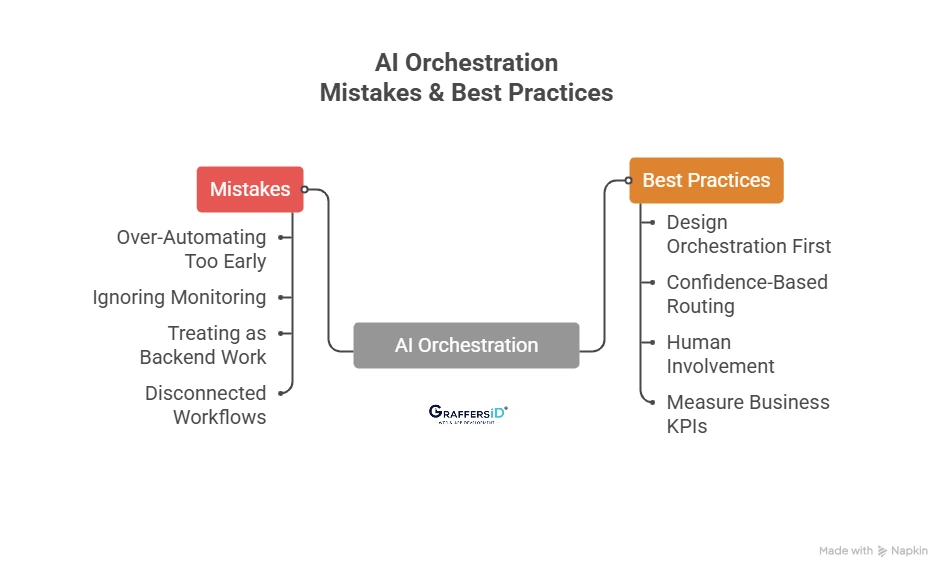
Common AI Orchestration Mistakes That Cause Failures
1. Over-automating too early: Trying to fully automate complex workflows before stability leads to errors, rework, and loss of trust in AI systems.
2. Ignoring monitoring and observability: Without logs, alerts, and performance tracking, teams don’t know when workflows fail, or why, until customers are impacted.
3. Treating orchestration as “just backend work”: AI orchestration shapes business outcomes. When it’s treated as a purely technical task, alignment with real processes is lost.
4. Letting teams build disconnected AI workflows: Independent AI implementations create silos. Over time, these systems conflict, duplicate effort, and become expensive to maintain.
How to Choose the Right AI Orchestration Tools and Platforms in 2026?
When companies evaluate AI orchestration platforms, we advise focusing on fundamentals, not hype.
1. Integration depth across systems and tools: The platform should connect easily with models, APIs, databases, and existing software, without heavy custom work for every change.
2. Security, access control, and audit readiness: Enterprise-ready orchestration requires role-based access, traceability, and compliance support from day one.
3. Flexibility across AI models and vendors: Avoid lock-in. The best orchestration setups allow teams to swap models as performance, cost, or regulations change.
4. Ability to scale and evolve with your business: AI systems change fast. Orchestration tools must support new workflows, agents, and automation patterns without re-architecture.
There is no single “best” AI orchestration tool. The right choice is the one that fits your architecture, team maturity, and long-term scale goals, not just today’s use case.

Conclusion
By 2026, success with AI is no longer defined by how many tools you use or how quickly you experiment. It’s defined by how reliably AI performs when your business scales.
AI orchestration is what makes that possible. When AI is orchestrated correctly, it becomes predictable, governable, and aligned with real business goals, not just impressive in demos.
At GraffersID, we work with growing companies to design, build, and implement AI frameworks that actually run in production.
Hire our expert AI developers to build AI-powered products or implement reliable AI automation that scales with your business.