
If your team is still copy-pasting data between tools, manually updating CRMs, chasing leads across platforms, or building reports in spreadsheets at midnight, you’re not alone. In 2026, manual work isn’t just inefficient; it’s a competitive disadvantage.
The gap between businesses that automate intelligently and those that don’t has never been wider. The companies pulling ahead today aren’t necessarily the ones with the biggest budgets; they’re the ones running smarter, AI-powered workflows that move data automatically, trigger actions in real time, and scale without increasing headcount.
That’s where Make.com comes in. From AI-driven lead routing and automated CRM updates to real-time customer support orchestration and financial reporting automation, Make.com has become one of the most adopted no-code workflow automation platforms among startups, SaaS companies, and enterprise teams alike.
But with other tools like Zapier, n8n, and Microsoft Power Automate also competing for attention, the obvious question is:
“Which automation platform is actually right for your business in 2026?”
In this guide, we’ll break down:
-
What Make.com is and how it works
-
Key features and benefits for modern businesses
-
How it compares to Zapier and n8n
-
Real-world use cases across sales, marketing, finance, and AI workflows
-
Step-by-step guidance to start automating repetitive processes
Whether you’re a CTO designing an automation architecture, a CEO optimizing operational efficiency, or a product leader exploring AI-driven workflows, this blog will help you make a clear, strategic decision.
What is Make.com?
Make.com is a visual no-code automation platform that allows businesses to connect applications and automate workflows without writing traditional code.

Originally launched in 2016 as Integromat by a Czech startup and later rebranded as Make.com in 2022, the platform evolved into a powerful automation solution used by startups, SaaS companies, and enterprise teams worldwide. Today, it is part of the Celonis ecosystem, strengthening its position in enterprise process automation.
In simple terms, Make.com helps businesses eliminate repetitive manual work by visually connecting their tools and systems.
Key Features of Make.com in 2026
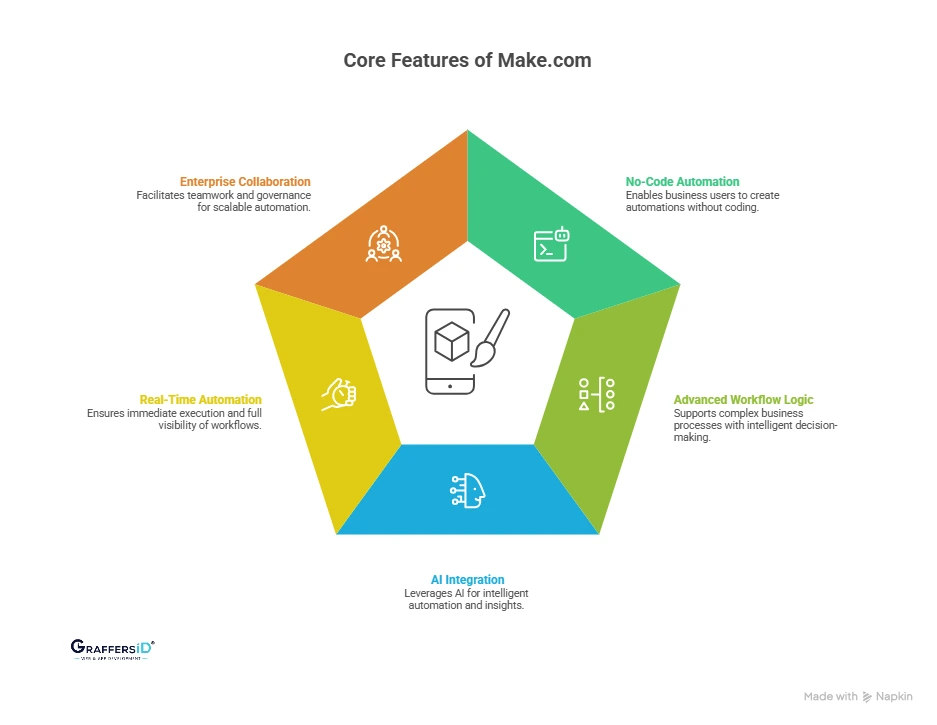
Automation in 2026 is no longer just about connecting apps. It is about building AI-driven, scalable, and governance-ready workflows that support modern digital businesses. Below are the most important features that make Make.com competitive in today’s automation landscape.
1. No-Code Automation with Developer-Level Flexibility
Make.com is built for both business users and technical teams.
- No-code workflow builder allows operations, marketing, and product teams to create automations without writing code.
- API and webhook support enable developers to extend workflows with custom logic.
- The hybrid automation model supports collaboration between business and engineering teams.
This reduces engineering dependency for routine workflows while maintaining technical scalability.
2. Advanced Workflow Logic for Complex Business Processes
Unlike basic automation tools, Make.com supports enterprise-grade logic.
- Conditional branching and filters for intelligent decision-making
- Nested workflows and routers for multi-step processes
- Built-in error handling and retry mechanisms for operational reliability
This makes it suitable for fintech, SaaS platforms, marketplaces, and high-volume transaction systems.
3. AI Integration and Intelligent Workflow Automation
In 2026, automation platforms must support AI orchestration, not just app connections. Businesses use Make.com to:
- Auto-classify and score leads using AI models
- Generate dynamic content using AI APIs
- Enrich CRM records with predictive insights
- Automate AI-powered customer support workflows
This aligns with the growing trend of combining workflow automation with AI decision-making systems.
Read More: What is n8n (Nodemation)? Features, Enterprise Use Cases, Pricing & AI Automation Guidein 2026
4. Real-Time Automation with Monitoring and Logs
Modern businesses require instant processing and full visibility.
- Webhook-based real-time triggers for immediate execution
- Scenario run logs and history tracking
- Visual debugging tools for workflow transparency
For CTOs and operations leaders, this ensures traceability, compliance readiness, and automation governance.
5. Enterprise Team Collaboration and Governance Controls
As automation scales, governance becomes critical.
- Shared workspaces for cross-functional teams
- Role-based access control (RBAC)
- Centralized scenario management
These features help organizations maintain automation consistency while preventing workflow sprawl.
How Make Works: Step-by-Step Workflow Automation (2026 Guide)
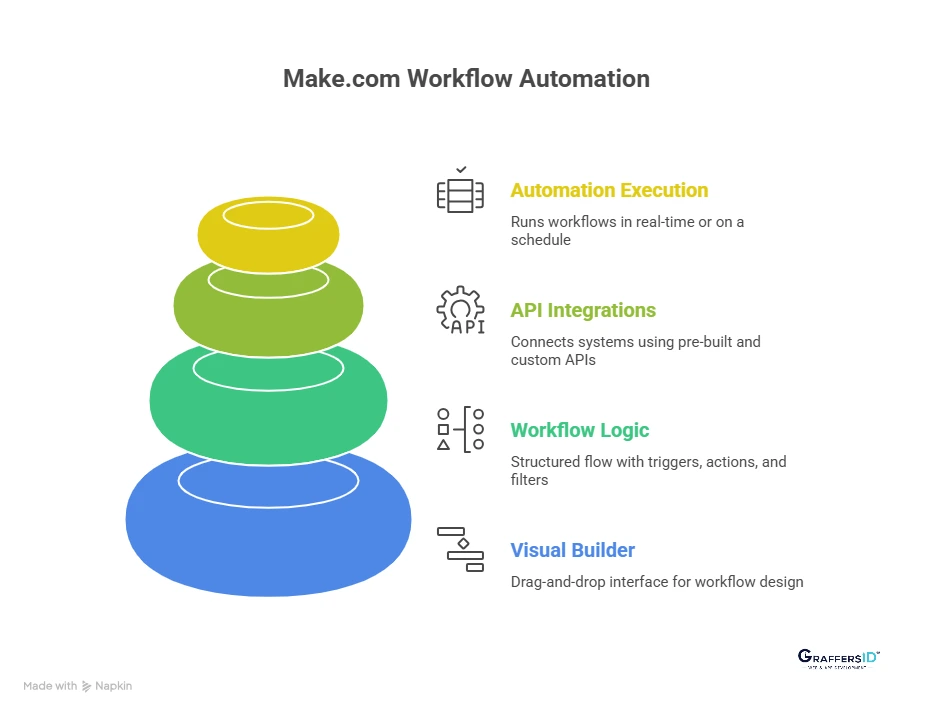
Make.com works by creating visual automation “scenarios” that define how data moves between apps. Instead of writing code, users design workflows using a drag-and-drop interface that controls triggers, actions, and logic in real time. Here’s how the system works in practice:
1. Visual Workflow Builder (Drag-and-Drop Automation)
Make.com uses a visual scenario builder where each step in a workflow is represented as a module connected in a flow diagram.
What this means for businesses:
-
You can clearly see how data moves from one app to another
-
Teams can understand workflows without reading backend code
-
Debugging becomes easier because each step is visually traceable
For CTOs and operations leaders, this improves transparency and cross-team collaboration, especially when managing complex automation environments.
2. Triggers, Actions, and Workflow Logic
Every Make.com automation follows a structured flow:
- Trigger: The event that starts the automation (e.g., new form submission)
- Action: The task performed automatically (e.g., update CRM record)
- Filters/Routers: Conditional paths based on logic rules
- Iterators: Process multiple data items within one workflow
Unlike basic automation tools, Make.com supports:
- Multi-branch logic for different business conditions
- Parallel execution of tasks
- Advanced data mapping and transformation
This makes it suitable for enterprise workflows that require intelligent decision-making and structured automation logic.
3. API Integrations, Webhooks, and Real-Time Data Sync
Make.com connects systems using both pre-built integrations and advanced API capabilities. It supports:
- Built-in connectors for hundreds of SaaS tools
- Custom API calls for proprietary systems
- Webhooks for real-time event triggers
- JSON parsing and structured data manipulation
For technical teams, this bridges the gap between no-code simplicity and developer-level customization. Businesses can automate standard SaaS tools while still integrating internal or legacy systems.
Read More: Best Automation Software in 2026: Top Platforms to Streamline Workflows & Boost Efficiency
How does Make.com Automates Workflows?
-
An event happens in one app (trigger)
-
Make.com processes the data using defined logic
-
It performs actions in other apps automatically
-
The workflow runs in real time or on a schedule
This architecture allows companies to build scalable, AI-ready automation systems without relying entirely on custom development.
How is Make.com used for Workflow Automation in 2026? Business Use Cases
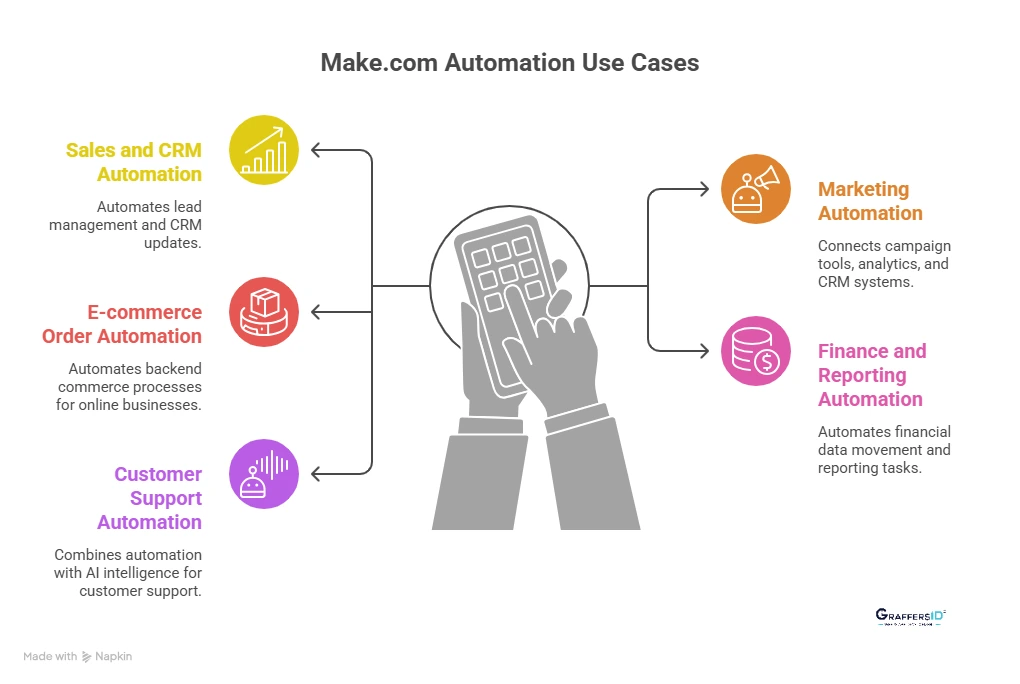
Below are the most common and high-impact use cases of Make.com in 2026. These workflows help companies reduce manual work, integrate AI tools, and build scalable automation systems across departments.
1. Sales and CRM Automation
Modern sales teams rely on real-time data flow between tools. Make.com automates lead management and CRM updates without developer dependency.
Common workflows include:
- Auto-assigning leads based on region, deal size, or source
- Syncing CRM data with email marketing and outreach tools
- Automatically updating deal stages when actions are completed
Business impact: Faster response times, cleaner CRM data, and improved conversion rates.
2. Marketing Automation and Campaign Workflows
Marketing in 2026 is AI-powered and behavior-driven. Make.com connects campaign tools, analytics platforms, and CRM systems into one automated flow.
Typical automation scenarios:
- Triggering email or ad campaigns based on user behavior
- Automated audience segmentation across platforms
- AI-based lead scoring using external AI APIs
Business impact: Higher personalization, reduced manual segmentation, and improved campaign ROI.
3. E-commerce Order and Operations Automation
For D2C and online businesses, operational speed directly impacts customer satisfaction. Make.com helps automate backend commerce processes.
Common use cases:
- Automating order-to-shipping workflows
- Real-time inventory synchronization across platforms
- Payment confirmation and invoice generation
Business impact: Reduced operational delays, fewer stock errors, and improved customer experience.
4. Finance and Automated Reporting Workflows
Finance teams spend significant time reconciling data across tools. Make.com automates financial data movement and reporting tasks.
Examples include:
- Automated invoice processing and approval routing
- Real-time dashboard generation
- Cross-platform reconciliation between accounting and payment systems
Business impact: Lower accounting overhead, improved accuracy, and faster financial visibility.
5. AI-Powered Customer Support Automation
Customer support in 2026 combines automation with AI intelligence. Make.com acts as the orchestration layer between support platforms and AI tools.
Common AI-integrated workflows:
- Automatic ticket classification based on query type
- AI-generated response drafts
- Escalation routing based on urgency or sentiment
Business impact: Faster resolution times, reduced support workload, and scalable 24/7 assistance.
Read More: What is Zapier AI Automation in 2026? How Businesses Can Streamline Workflows Without Code?
Enterprise Benefits of Using Make.com in 2026
- Lower Operational Costs with Workflow Automation: Make.com reduces repetitive manual work, minimizes human errors, and cuts down development hours by replacing custom integrations with scalable automation workflows. This directly lowers operational expenses while improving productivity.
- Better Data Accuracy & Real-Time Synchronization: With automated, real-time data syncing across apps, Make.com eliminates duplication, reduces inconsistencies, and ensures every department works from a single, reliable source of truth.
- Faster Time to Market & Campaign Execution: Automation removes process bottlenecks in product releases, marketing campaigns, and internal approvals, enabling teams to move from idea to execution significantly faster in competitive markets.
- Scalable Automation Without Increasing Headcount: As businesses grow, Make.com allows workflows to scale automatically, handling higher data volumes and complex logic without requiring proportional hiring or additional engineering resources.
Make vs. Zapier vs. n8n: Which Automation Tool Is Best in 2026?
| Feature | Make.com | Zapier | n8n |
|---|---|---|---|
| Best For | Scaling businesses | Small teams & marketers | Developers & technical teams |
| Workflow Complexity | Advanced, multi-branch | Linear workflows | Highly customizable |
| Visual Builder | Advanced flow diagram | Step-based | Technical visual builder |
| Custom API Support | Strong | Moderate | Very strong |
| Hosting | Cloud | Cloud | Self-hosted or cloud |
| AI Integration | API-driven AI workflows | Basic AI triggers | Developer-led AI integrations |
| Learning Curve | Moderate | Easy | Technical |
Bottom Line: Choose Make.com if you need enterprise-grade logic without building everything from scratch, Zapier for simple marketing automation, and n8n if you want full developer control.
How to Use Make.com for Business Automation? (Step-by-Step Guide 2026)
If you’re wondering how to implement Make.com for your business, follow this practical, ROI-focused framework used by modern SaaS and enterprise teams in 2026.
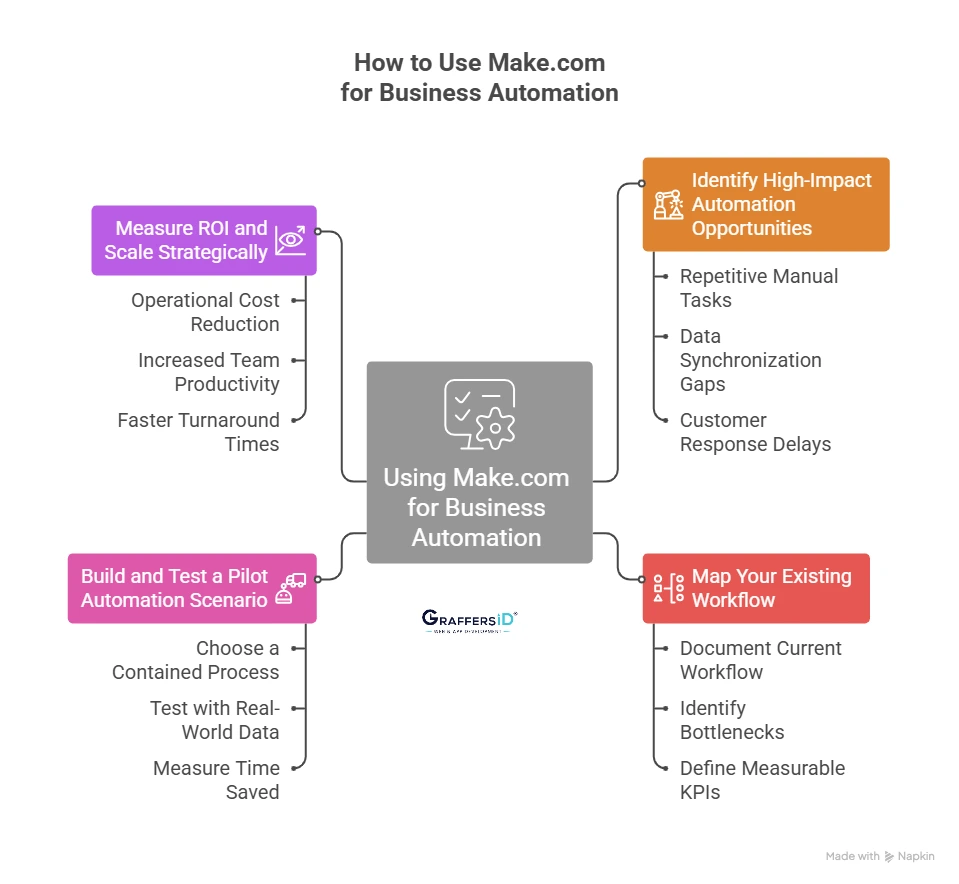
1. Identify High-Impact Automation Opportunities
Before building anything, identify where automation will create immediate business value. Focus on:
- Repetitive manual tasks: Tasks like copying data between tools, updating CRMs, sending follow-ups, or generating reports are prime candidates for automation.
- Data synchronization gaps: If your sales, marketing, and support tools don’t update in real time, automation can eliminate inconsistencies and prevent revenue leakage.
- Customer response delays: Automating lead routing, ticket assignment, or onboarding workflows can significantly reduce response time and improve customer experience.
In 2026, the best automation strategies prioritize workflows that directly impact revenue, cost savings, or customer satisfaction.
2. Map Your Existing Workflow Before Automating
Automation should optimize a process, not automate chaos. Before building a scenario in Make.com:
- Document the current workflow: Outline each step from trigger to outcome. Identify who is involved and which tools are used.
- Identify bottlenecks and friction points: Where does work slow down? Where do errors happen? These are automation leverage points.
- Define measurable KPIs: Examples:
-
Lead response time
-
Report generation time
-
Manual hours spent per week
-
Error rate in data entry
-
Clear KPIs make it easier to measure automation ROI later.
3. Build and Test a Pilot Automation Scenario
Start small with one high-impact workflow instead of automating everything at once. Best practice in 2026:
- Choose a contained, measurable process: For example, automatically assign new website leads to the correct sales rep.
- Test with real-world data: Monitor logs, error handling, and conditional logic performance.
Measure:
- Time saved per week
- Reduction in manual errors
- Improvement in process speed
A successful pilot builds internal confidence and executive buy-in.
4. Measure ROI and Scale Strategically
Automation is not a one-time project; it’s an operational strategy. After deployment, continuously track:
- Operational cost reduction: Compare pre-automation and post-automation labor costs.
- Increased team productivity: Measure how much time teams now spend on strategic tasks instead of repetitive work.
- Faster turnaround times: Track improvements in lead response, reporting cycles, and support resolution.
In 2026, leading companies treat automation as a performance lever, directly tied to business KPIs, revenue growth, and scalability.

Conclusion: Is Make.com the Right Automation Tool for Your Business in 2026?
In 2026, automation is no longer about saving a few working hours; it’s about building scalable, AI-ready operational workflows.
Make.com stands out because of its no-code simplicity, API integrations, and multi-step business processes. For startups, SaaS companies, and mid-to-large enterprises, Make.com offers a practical middle ground, more powerful than basic automation tools, yet faster and more cost-efficient than building everything from scratch.
Ready to Build AI-Driven Automation for Your Business?
At GraffersID, we help companies design scalable automation architecture and integrate AI into existing products and workflows.
Hire experienced AI developers from GraffersID today and start building an intelligent automation ecosystem that scales with your business in 2026 and beyond.