
Your website design is costing you rankings, and most teams don’t even know it.
In 2026, Google doesn’t just read your content. It experiences your website the same way a visitor does, measuring how long they stay, whether they find what they came for, and how naturally your content answers real questions. AI-powered platforms like Google’s AI Overviews, Perplexity, and ChatGPT go even further: they pull answers from pages that are structured for machine comprehension, not just human eyes.
That changes everything about how design decisions get made. For CTOs, CEOs, and product leaders, the uncomfortable truth is this: a poorly designed website is a leaking revenue pipe. Slow load times, cluttered layouts, and content that’s hard to parse don’t just frustrate users; they generate negative behavioral signals that search engines and AI systems use to quietly deprioritize your pages. You can publish the best content in your industry and still lose to a competitor whose site simply communicates better to both humans and algorithms.
What does “better” look like in 2026? It means designing for five intersecting dimensions: user behavior, content structure, page experience, semantic relevance, and AI readability, as a unified system, not an afterthought.
This guide breaks down how a website design affects rankings in 2026 and how to optimize it for both users and AI systems.
Why Website Design is Important for SEO and AI Search Rankings in 2026?
Modern search engines and AI systems no longer rank websites based only on keywords. They evaluate how users interact with your site, how content is structured, and how easily information can be understood and extracted.
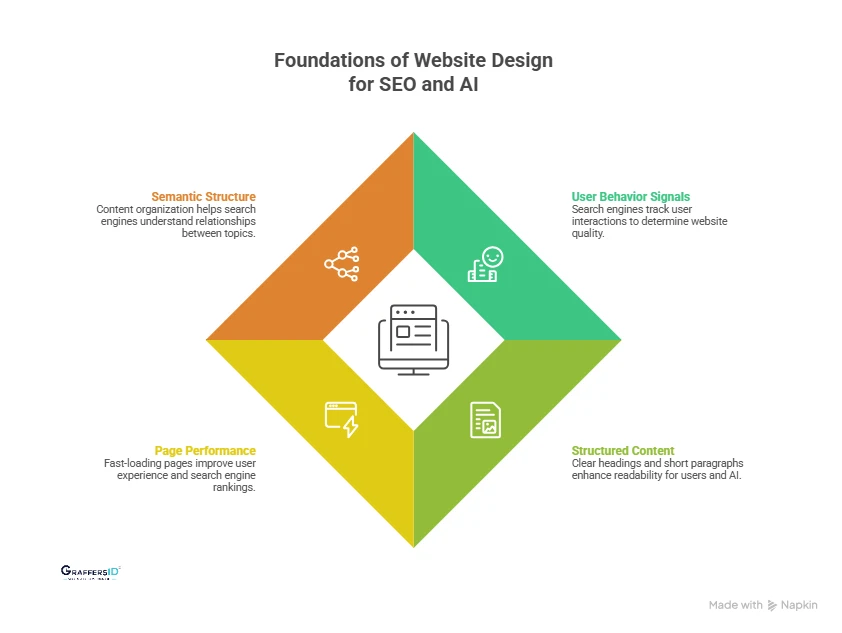
1. User Behavior Signals (Engagement & Dwell Time)
Search engines track how users interact with your website to determine its quality and relevance.
- Dwell time: Longer time on page signals valuable content
- Bounce rate: High exits indicate a poor experience or a mismatch
Well-designed websites keep users engaged, improving rankings and AI trust.
2. Structured and Scannable Content for AI Readability
Both users and AI models prefer content that is easy to scan and understand.
- Use clear headings (H1, H2, H3)
- Break content into bullets and short paragraphs
Structured design helps AI systems extract answers for featured snippets and AI Overviews.
3. Page Performance and Speed Optimization
Website performance directly impacts both user experience and rankings.
- Fast-loading pages reduce drop-offs
- Core Web Vitals (LCP, INP, CLS) influence rankings
Faster websites are more likely to be crawled, indexed, and surfaced in AI results.
4. Semantic Structure and Entity-Based Understanding
Modern SEO is based on context, not just keywords.
- Search engines analyze relationships between topics (entities)
- Content structure helps define meaning and relevance
A well-structured website improves visibility in AI answers and knowledge-based search results.
How Website Design Affects SEO Rankings in 2026 (Key Factors)?
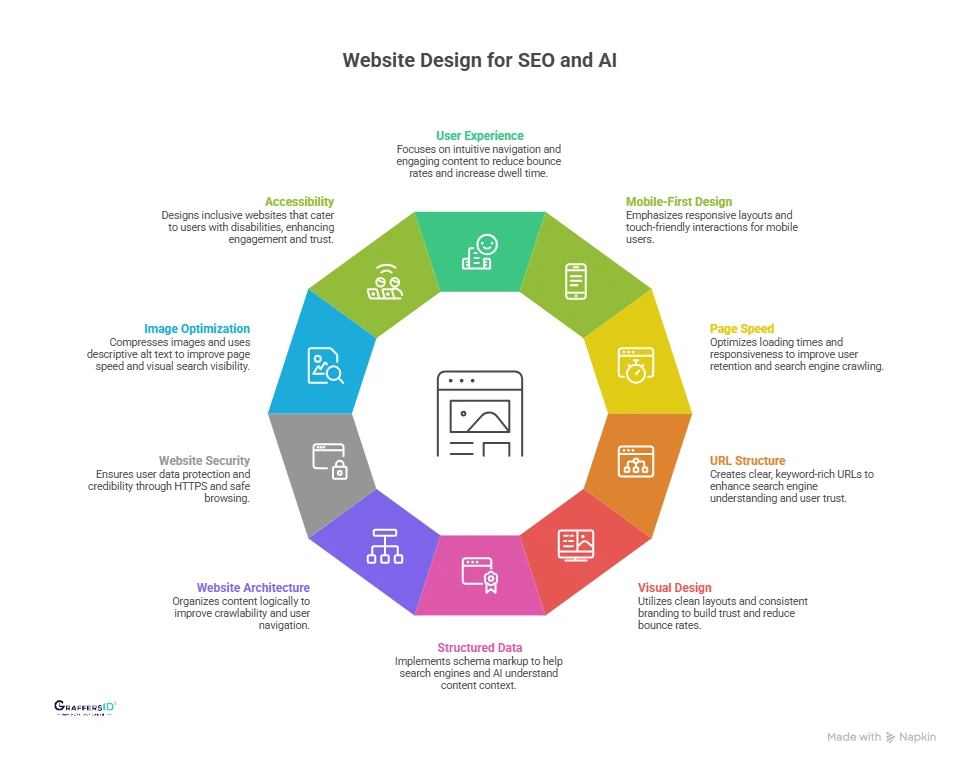
1. User Experience (UX) and Engagement Signals
Search engines and AI systems evaluate how users interact with your website to determine its quality, relevance, and usefulness. A smooth, intuitive experience signals that your content satisfies user intent.
In 2026, UX is not just a design factor; it directly influences rankings, AI answer selection, and overall visibility.
Key UX Signals That Affect Rankings
- Bounce Rate (Quick Exits): If users leave your site without interacting, it signals poor relevance or usability, negatively impacting rankings.
- Dwell Time (Time on Page): A longer time spent on a page indicates valuable and engaging content, increasing your chances of ranking higher.
- Pages per Session (User Journey Depth): When users explore multiple pages, it shows strong internal linking and content relevance, improving SEO performance.
How to Optimize UX for Better Rankings?
- Simplify Navigation and User Flow: Ensure users can easily find what they’re looking for with a clear menu structure and logical page hierarchy.
- Use Clear CTAs and Structured Layouts: Guide users with visible calls-to-action and break content into headings, bullets, and short sections for easy scanning.
- Reduce Friction in Content Consumption: Avoid clutter, improve readability, and ensure fast loading to keep users engaged throughout their journey.
2. Mobile-First Design and Responsiveness
Search engines use mobile-first indexing, meaning your website’s mobile version is the primary basis for ranking and indexing. Most users browse on mobile, so poor mobile UX leads to higher bounce rates.
AI systems also prefer mobile-optimized, fast-loading pages for answer extraction. If your mobile experience is weak, your overall search visibility will drop, even with strong content.
Key Mobile SEO Signals Search Engines Track
- Mobile Usability and Responsive Layouts: Your website should adapt seamlessly to different screen sizes without breaking layout or content structure. Content should be readable without zooming. Layouts should adjust dynamically across devices.
- Touch-Friendly Design and Interaction: Mobile users interact with screens differently from desktop users. Buttons and links should be large and easy to tap. Navigation should be simple and thumb-friendly.
- No Intrusive Popups or Interstitials: Disruptive elements negatively impact both user experience and rankings. Avoid full-screen popups that block content. Ensure important content is immediately accessible.
How to Optimize Your Website for Mobile SEO?
- Use Responsive Design Frameworks: Build flexible layouts that automatically adjust to all screen sizes. Use modern CSS frameworks (like Flexbox or Grid). Maintain consistency across devices.
- Improve Readability and Tap Accessibility: Ensure users can easily read and interact with your content on small screens. Use legible font sizes and proper spacing. Optimize tap targets for buttons and links.
- Test Across Devices and Real User Conditions: Regular testing helps identify usability issues before they impact rankings. Test on multiple devices and browsers. Use tools like mobile usability reports and performance audits.
3. Page Speed and Core Web Vitals
Page speed is a confirmed ranking factor and a critical UX signal that affects how users interact with your website. Faster pages reduce bounce rates and increase engagement.
Search engines prioritize fast sites for better crawling and indexing. In 2026, speed also impacts how easily AI systems access and process your content.
Key Core Web Vitals You Must Optimize
- Largest Contentful Paint (LCP) – Loading Speed: Measures how quickly the main content of a page becomes visible to users. Ideal LCP: under 2.5 seconds. Slow LCP leads to poor first impressions and higher drop-offs.
- Interaction to Next Paint (INP) – Responsiveness: Measures how quickly your website responds to user interactions like clicks or taps. Ideal INP: under 200 milliseconds. Delays create frustration and reduce engagement.
- Cumulative Layout Shift (CLS) – Visual Stability: Measures how stable your layout is while loading. Ideal CLS: below 0.1. Sudden shifts can disrupt user experience and trust.
How to Improve Page Speed and Performance?
- Optimize Media and Assets: Compress images without losing quality. Use modern formats like WebP or AVIF.
- Improve Delivery with Caching and CDN: Enable browser caching for repeat visitors. Use a CDN to serve content faster globally.
- Reduce Code and Unnecessary Scripts: Minify CSS and JavaScript files. Remove unused code and third-party scripts.
Read More: Why UI/UX Design Matters in Web App Development (2026): Impact on SEO, Conversions & User Experience
4. SEO-Friendly URL Structure
URLs help search engines and AI systems quickly understand what a page is about and how it fits within your website. They act as contextual signals for ranking and indexing.
Clean URLs improve click-through rates (CTR) and user trust, leading to an increase in both search visibility and AI answer eligibility.
Key URL Signals That Impact Rankings
- Keyword Relevance in URLs: Including primary keywords in URLs helps define the topic of the page. Use natural keywords that match search intent. Avoid keyword stuffing or unnatural phrasing.
- URL Readability and Simplicity: Readable URLs improve both user experience and search engine understanding. Keep URLs short and easy to interpret. Avoid unnecessary numbers, symbols, or parameters.
- Logical Hierarchy and Structure: A structured URL reflects your website’s architecture and content relationships. Use category-based paths (e.g., /blog/seo/technical-seo/). Maintain consistency across similar pages.
How to Optimize URLs for SEO and AEO in 2026?
- Use Short, Descriptive, Keyword-Based URLs: Focus on clarity and intent rather than length or complexity. Example: /website-design-seo-guide. Avoid vague or generic slugs like /page1.
- Maintain a Consistent URL Structure Across the Site: Consistency improves crawlability and strengthens site organization. Follow a uniform pattern for blogs, services, and categories. Avoid frequent URL changes that break indexing.
- Avoid Dynamic and Complex URL Parameters: Dynamic URLs make it harder for search engines and AI systems to interpret content. Replace long query strings with clean static URLs. Use canonical tags if dynamic URLs are necessary.
5. Visual Design and Bounce Rate Optimization
Users form a first impression of your website within 2–3 seconds, which directly influences whether they stay or leave. Poor design creates confusion and increases bounce rates.
Clean, intuitive design builds trust and encourages interaction. Search engines and AI systems interpret this behavior as a signal of content quality and relevance.
Key UX Signals Influenced by Visual Design
- Time to First Interaction: This measures how quickly users engage with your page after it loads. Slow or confusing layouts delay interaction. Clear design prompts faster clicks and scrolling.
- Visual Hierarchy and Layout Clarity: A strong visual hierarchy helps users quickly understand what matters most on the page. Proper use of headings, spacing, and contrast improves navigation. Highlighting key sections guides users toward important actions.
- Content Readability and Scanability: Users prefer content that is easy to read and skim, especially on mobile devices. Short paragraphs, bullet points, and clear fonts improve readability. Well-structured content helps AI systems extract answers more effectively.
How to Optimize Visual Design for SEO and AI Visibility?
- Use Clean and Structured Layouts: Design pages with proper spacing and alignment to reduce cognitive load. Follow grid-based layouts and maintain consistent margins and padding.
- Maintain Consistent Branding and Typography: Consistency builds trust and improves user familiarity across pages. Use limited font styles and sizes. Keep colors and UI elements uniform.
- Avoid Clutter and Unnecessary Elements: Too many visual elements distract users and reduce engagement. Remove redundant sections and distractions. Limit excessive animations and popups.
6. Structured Data and Schema Markup
Structured data helps search engines and AI models clearly understand what your content is about and how different elements are connected. It adds context to your pages beyond keywords.
It makes content easier for AI systems to extract and summarize. In 2026, schema is essential for getting featured in rich results and AI-generated answers.
Key Benefits of Using Schema Markup
- Helps You Appear in Rich Snippets: Schema enables enhanced search results like FAQs, ratings, and breadcrumbs. Improves visibility in SERPs. Makes your listing more attractive and informative.
- Improves Click-Through Rate (CTR): Rich results stand out visually, increasing the likelihood of user clicks. Adds extra information directly in search results. Builds trust before users even visit your page.
- Increases Chances of AI Answer Inclusion: AI systems rely on structured data to extract precise and relevant answers. Improves content eligibility for AI Overviews. Helps LLMs identify key information quickly. Well-structured content is more likely to be selected as the answer, not just ranked.
How to Implement Schema Markup Effectively?
- Use High-Impact Schema Types: Focus on schemas that directly improve visibility and extraction. FAQ schema for question-based content. Article schema for blogs and guides. Breadcrumb schema for navigation clarity. Product schema for eCommerce pages.
- Structure Content for Schema Alignment: Your content format should support structured data. Use clear headings and question-based sections. Add concise answers under each question. Maintain logical content hierarchy.
- Validate and Monitor Schema Performance: Ensure your schema is correctly implemented and effective. Use schema validation tools. Monitor rich results in search performance reports. Fix errors or warnings regularly.
Read More: UI vs UX Design in 2026: Key Differences, Examples, and How AI Is Transforming Digital Experiences
7. Website Architecture and Internal Linking
A well-organized website helps both search engines and AI systems easily crawl, understand, and connect your content. It improves how pages are discovered and indexed, helps AI models map relationships between topics, and enhances user navigation and content flow.
A clear structure turns your website into a connected knowledge system, not just isolated pages.
Key SEO Signals to Focus On
- Crawl Depth and Accessibility: Crawl depth refers to how many clicks it takes to reach a page from the homepage. Important pages should be accessible within 2–3 clicks. Shallow structures improve indexing speed and visibility.
- Internal Link Distribution: Internal links help distribute authority across your website and guide both users and crawlers. Links pass relevance and ranking signals between pages. Strategic linking improves the visibility of important pages.
- Page Hierarchy and Content Relationships: A clear hierarchy helps define how topics and subtopics are connected. Organize content into categories and subcategories. Maintain a logical flow from broad topics to specific pages.
How to Optimize Website Structure and Internal Linking?
- Create a Logical Content Hierarchy: Structure your website in a pyramid format: Homepage → Category pages → Subcategory → Individual pages. Group related content under clear topical clusters.
- Add Contextual Internal Links: Link related pages naturally within your content. Use descriptive anchor text (avoid generic “click here”). Connect supporting content to main (pillar) pages.
- Use Breadcrumb Navigation: Breadcrumbs show users and search engines where they are within the site. Improve navigation and user experience. Add structured data for better visibility in search results.
8. Website Security (HTTPS and Trust Signals)
Website security is a confirmed ranking factor and a critical trust signal for both users and search engines. Secure websites protect user data and improve credibility. Search engines prioritize HTTPS-enabled sites in rankings.
AI systems are more likely to reference trusted and secure sources. In 2026, security is not optional; it’s a baseline requirement for visibility.
Key Security Signals Search Engines Consider
- HTTPS implementation: Ensures encrypted communication between browser and server.
- Data encryption: Protects sensitive user information like forms and logins.
- Safe browsing status: Flags malware, phishing, or harmful content risks.
How to Optimize Website Security for Better Rankings?
- Install SSL certificates: Enable HTTPS across all pages for secure connections.
- Fix mixed content issues: Ensure all resources (images, scripts) load over HTTPS.
- Update security protocols: Regularly patch vulnerabilities and maintain server security.
9. Image Optimization for SEO and Performance
Images are no longer just visual elements; they directly impact page speed, user experience, and visibility in visual and AI-driven search results. Faster-loading images improve user retention and Core Web Vitals.
Optimized visuals can rank in Google Images and AI-powered visual search. Well-optimized images help both search engines and AI systems understand and surface your content.
Key Image SEO Signals Search Engines Track
- Image load time: Heavy images slow down pages and hurt rankings.
- Alt text relevance: Helps search engines understand image context.
- File size and format: Impacts speed, rendering, and indexing.
How to Optimize Images for SEO and AI Search?
- Use descriptive alt text: Clearly describe the image using natural language and relevant keywords. Helps with accessibility and AI content understanding.
- Compress images without losing quality: Use tools like TinyPNG or Squoosh to reduce file size. Improves load speed and Core Web Vitals.
- Use modern image formats (WebP/AVIF): These formats provide better compression and faster loading. Preferred by modern browsers and search engines.
Read More: 10 Essential Web Design Features for a High-Impact Website
10. Accessibility and Inclusive Design
Accessible websites ensure that all users, including those with disabilities, can interact with your content easily, which improves engagement signals and overall site performance.
Better accessibility leads to higher dwell time and lower bounce rates. Search engines and AI models favor well-structured, inclusive content. Accessibility is no longer optional; it directly supports SEO, AEO, and user trust.
Key Accessibility Signals That Impact Rankings
- Screen Reader Compatibility: Content should be structured so screen readers can interpret and present it accurately to users. Use proper heading hierarchy (H1–H3). Add descriptive alt text for images.
- Keyboard Navigation Support: Users should be able to navigate your website without relying on a mouse. Ensure all interactive elements are keyboard accessible. Maintain logical tab order across the page.
- Readability and Color Contrast: Text should be easy to read across all devices and for all types of users. Maintain sufficient contrast between text and background. Use clear fonts, proper spacing, and readable font sizes.
How to Optimize Your Website for Accessibility?
- Use Semantic HTML Structure: Semantic tags help both search engines and assistive technologies understand your content. Use tags like
<header>,<article>,<section>correctly. Maintain a logical content hierarchy. - Enable Navigation Without a Mouse: Design your interface so users can fully operate it using a keyboard. Make menus, buttons, and forms accessible via keyboard. Avoid interactions that require only mouse actions.
- Follow Modern Accessibility Standards (WCAG): Align your website with global accessibility guidelines to improve usability and compliance. Maintain proper color contrast ratios. Ensure scalable text and responsive layouts.

Conclusion: Website Design Is the Foundation of SEO and AI Visibility in 2026
Website design is no longer just about how your site looks; it directly determines how well your business performs in search and AI-driven discovery. In 2026, search engines and AI systems evaluate websites based on experience, structure, and clarity, not just keywords. This means every design decision, from layout to speed to content formatting, impacts whether your website ranks or gets ignored.
A high-performing website design helps you improve search rankings and organic visibility, deliver seamless user experiences that increase engagement and convert visitors into leads and customers.
The winning strategy is simple: Design for humans. Structure for search engines. Optimize for AI. Businesses that align all three will dominate both traditional search results and AI-powered discovery platforms.
At GraffersID, we help startups and enterprises design high-performance, conversion-focused websites and build scalable web and app solutions.
Hire expert remote developers from GraffersID to build a website that ranks and drives real business growth.