In 2026, automation is no longer about saving time; it’s about building AI-powered operational infrastructure. For CTOs, product leaders, and founders, the questions are:
- How do we automate cross-team workflows at scale?
- How do we integrate AI agents into production systems?
- How do we prevent SaaS automation costs from spiraling out of control?
- How do we maintain data ownership, compliance, and security?
Traditional no-code tools like Zapier and Make were built for task automation, not AI-driven operational orchestration. As enterprises move toward AI-native systems, these platforms often struggle with scalability, customization, and enterprise governance.
This is where n8n (short for “Nodemation”) is rapidly gaining enterprise adoption. n8n has emerged as a developer-first, AI-ready, open-source workflow automation platform built for flexibility, scale, and cost control.
If you’re searching for:
- What is n8n?
- n8n features in 2026
- n8n enterprise use cases
- n8n enterprise features and pricing
- Or whether n8n is the right alternative to Zapier at scale
This guide covers everything you need to know, with practical insights tailored for decision-makers building AI-powered infrastructure. Let’s break it down.
What is n8n?
n8n (short for Nodemation) is an open-source workflow automation and AI orchestration platform that helps businesses build, manage, and scale automated workflows with full developer control.
It combines visual workflow building with code-level customization and self-hosting capabilities, making it suitable for startups, scaling teams, and enterprises.
In simple terms, n8n connects apps, APIs, databases, and AI models to automate complex business processes.
Instead of building backend automation systems from scratch, teams can design workflows visually while still having the flexibility to write custom logic in JavaScript when needed.
Read More: Best Automation Software in 2026: Top Platforms to Streamline Workflows & Boost Efficiency
How is n8n Different from Other Automation Tools?
Unlike traditional no-code platforms, n8n sits between:
- Custom-coded backend automation systems
- SaaS automation tools like Zapier
- Visual workflow platforms like Make
This hybrid positioning gives businesses more control without sacrificing speed.
As of 2026:
- 100,000+ active developers use n8n
- 20,000+ companies run workflows in production
- AI-native automation and AI agent orchestration are among its fastest-growing enterprise use cases
With enterprises shifting toward AI-powered operational systems, n8n has emerged as a scalable alternative to SaaS-only automation platforms.
Key Features of n8n in 2026
Below are some notable n8n features in 2026 that make it a strong choice for AI automation, enterprise workflows, and scalable operations.
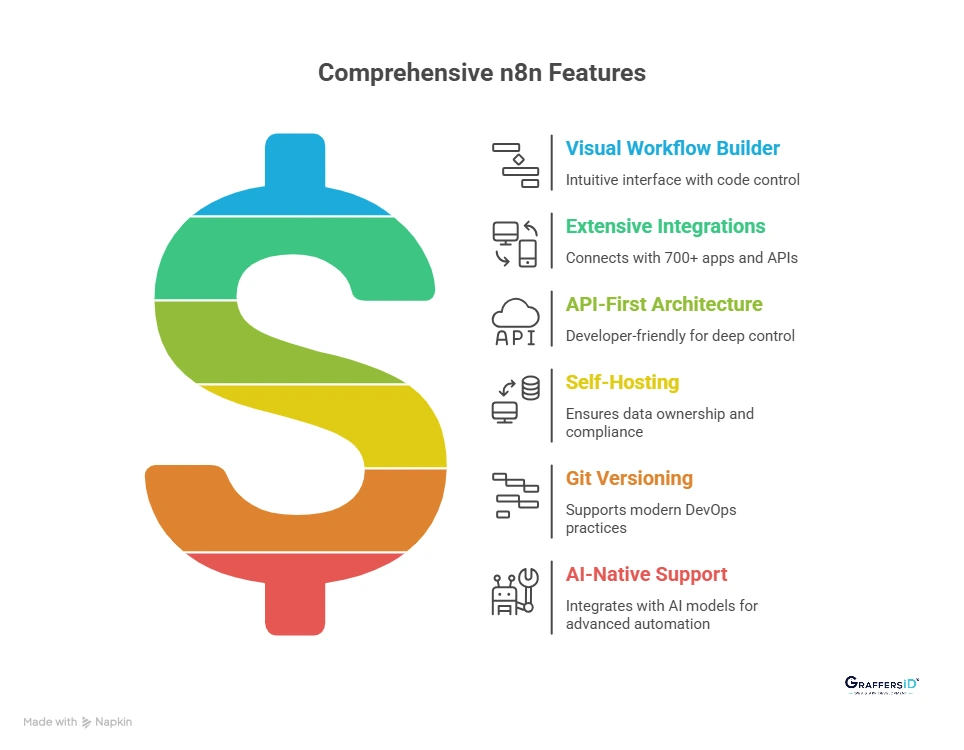
1. Visual Workflow Builder with Full Code Control
n8n uses a modular node-based visual interface where every step in a workflow is represented as a node. This allows teams to design complex automation logic without writing everything from scratch. Nodes can include:
- API calls
- Database queries
- AI model integrations
- Conditional logic and loops
- Data transformation steps
- Webhooks
- Custom JavaScript functions
This hybrid approach gives business teams visual simplicity, and developers complete coding flexibility.
2. 700+ Native Integrations Across Apps & Unlimited APIs
n8n supports over 700 built-in integrations across CRMs, databases, SaaS tools, cloud platforms, payment systems, and communication apps. With these integrations, you can:
- Sync CRM and sales data
- Automate email workflows
- Move files between storage systems
- Connect custom REST APIs
- Trigger workflows using webhooks
This makes n8n suitable for building cross-team automation across your entire tech stack.
3. API-First and Developer-Friendly Architecture
n8n is built for technical teams that need deeper control over automation systems. Developers can:
- Use HTTP Request nodes to call any external API
- Write inline JavaScript for custom logic
- Securely pass environment variables
- Manage authentication using OAuth2, API keys, or basic auth
- Deploy via Docker or Kubernetes
This makes n8n ideal for CTO-led teams that want scalable automation without building a backend system from scratch.
4. Self-Hosting for Full Data Ownership & Compliance
One of the biggest reasons enterprises choose n8n is its full self-hosting capability. Key benefits include:
- No vendor lock-in
- No execution-based cost explosion
- Complete data ownership
- GDPR-friendly and compliance-ready deployments
- Better control for fintech, healthtech, and legal tech companies
In 2026, data control and infrastructure independence are major enterprise priorities, and n8n supports both.
5. Git Versioning and CI/CD Deployment Support
n8n workflows can be treated like software code, not just visual automations. Teams can:
- Version workflows using Git
- Deploy changes through CI/CD pipelines
- Maintain staging and production environments
- Track workflow history and changes
This makes n8n compatible with modern DevOps practices and enterprise engineering workflows.
6. AI-Native Workflow and Agent Support
n8n is deeply integrated with modern AI systems, making it suitable for AI orchestration and agent-based automation. It can connect with:
- OpenAI GPT models
- Anthropic Claude models
- Hugging Face APIs
- Google DeepMind Gemini APIs
AI can be used to:
- Summarize documents
- Classify and tag support tickets
- Perform sentiment analysis
- Extract structured data from unstructured text
- Power internal AI agents
- Automate reasoning-based decision workflows
In 2026, AI orchestration is becoming a core requirement in enterprise automation tools, and n8n is architecturally designed to support it.
Read More: What is Zapier AI Automation in 2026? How Businesses Can Streamline Workflows Without Code?
Key Benefits of Using n8n in 2026: Why Use n8n?
n8n Use Cases in 2026 (Real-World Business Applications)
Below are practical, n8n enterprise use cases, explaining how companies use n8n in 2026:
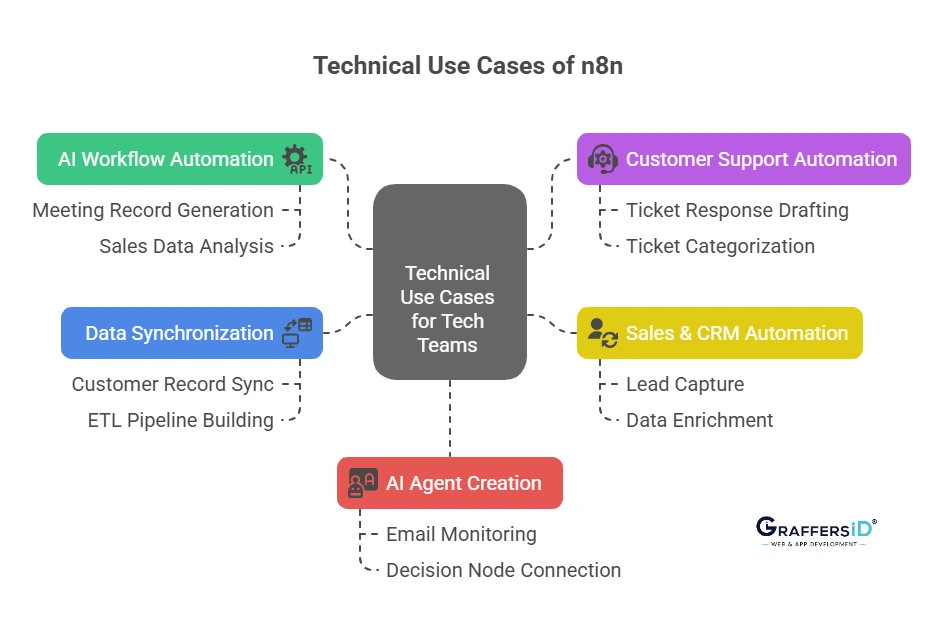
1. AI Workflow Automation with LLM Integration
n8n enables businesses to combine workflow automation with AI models like OpenAI GPT and Anthropic Claude to automate decision-making processes. Example workflow:
- Automatically generate meeting records and send a Slack summary or update Notion.
- Analyze sales data and send it to dashboards to generate insight-driven reports.
Other use cases include:
- Automated RFP response generation
- AI-powered sales call analysis
- Intelligent reporting dashboards
- Autonomous data enrichment pipelines
This reduces manual analysis and speeds up decision cycles.
2. Enterprise Customer Support Automation with AI Classification
Enterprises use n8n to automate support operations using AI-driven workflows. With n8n, teams can:
- Automatically classify tickets based on intent and urgency
- Generate draft responses using AI
- Update CRM records in real time
- Trigger escalation logic for high-priority cases
- Detect sentiment to flag negative interactions
This typically reduces manual workload by 40–60% while improving response consistency.
3. Sales & CRM Automation at Scale
n8n helps automate the full sales pipeline without building a custom backend system. Common enterprise workflows include:
- Capturing leads from landing pages or forms
- Enriching data via third-party APIs
- AI-based lead scoring
- Automatic sales rep assignment
- Triggering multi-channel outreach (email, Slack, CRM updates)
This ensures faster lead response times and higher conversion rates.
4. Real-Time Data Synchronization & ETL Pipelines
n8n acts as a lightweight orchestration layer between business systems. Typical use cases:
- PostgreSQL ↔ Google Sheets synchronization
- SaaS tools syncing with internal databases
- Automated backup workflows
- ETL pipelines feeding analytics dashboards
This keeps enterprise data consistent, accurate, and production-ready across departments.
5. AI Agent Development & Autonomous Operations
In 2026, many companies build internal AI agents to automate repetitive knowledge work. With n8n, enterprises can:
- Monitor inboxes or webhooks
- Analyze context using AI
- Decide next actions based on logic rules
- Log updates in CRM
- Send responses or escalate complex cases
This enables semi-autonomous business operations without requiring heavy AI infrastructure or custom backend development.
n8n Pricing with Enterprise Features in 2026
1. n8n Cloud Pricing (Hosted by n8n)
| Plan | Monthly Price | Executions/Month | Best For |
| Starter | $20 | 2,000 | Freelancers, micro-teams |
| Pro | $50 | 10,000 | Scaling startups |
| Business | $120+ | Custom | Enterprises with SLAs |
This includes managed hosting, scaling, support tiers, and SLAs (Business plan).
2. Self-Hosted Option
- Free under fair-code license.
- Deploy on VPS (e.g., DigitalOcean, AWS, etc., for $5–20/month typical infra cost).
- Full execution freedom
- Optional paid support is available for enterprise-grade SLAs.
n8n Cost Advantage: Compared to tools like Zapier or Make:
- Self-hosting can reduce automation cost by 70–90% at scale
- No per-task pricing explosion
- Predictable infrastructure-based cost
For enterprises managing millions of executions, this is a major differentiator.
n8n vs. Zapier vs. Make: Feature Comparison (2026)
Below is a simple, decision-focused comparison for teams evaluating enterprise automation platforms:
| Feature | n8n | Zapier | Make |
|---|---|---|---|
| Open-Source | Yes (fair-code license) | No | No |
| Self-Hosting Option | Yes | No | No |
| Code-Level Customization | Full JavaScript & API access | Limited | Moderate |
| Enterprise Cost at Scale | Infrastructure-based, predictable | Expensive at high task volumes | Moderate but usage-based |
| AI Workflow Support | Native AI orchestration support | AI added later | AI added later |
| Best For | Developer-led, scalable systems | Simple SaaS automation | Visual automation for SMBs |
Bottom Line: For startups, Zapier may be simpler. For scaling companies, n8n offers better control.
Is n8n a Good Fit for Your Enterprise in 2026?
If you’re evaluating whether n8n is the right automation platform for your organization, here’s a practical decision framework tailored for CTOs and product leaders.
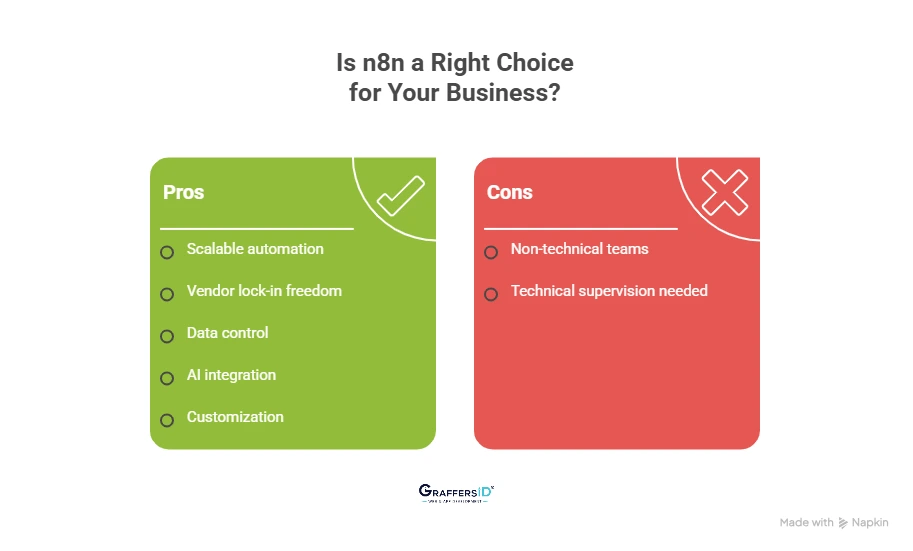
Use n8n If Your Business Needs
1. Enterprise-Scale Workflow Automation
If you run thousands or millions of workflow executions per month, n8n’s infrastructure-based pricing (especially self-hosted) helps you scale without unpredictable per-task SaaS costs.
2. Freedom from SaaS Vendor Lock-In
n8n is open-source and portable. You can migrate, customize, or extend workflows without being tied to a proprietary ecosystem.
3. Self-Hosting for Data Control & Compliance
For fintech, healthtech, or compliance-sensitive industries, self-hosting ensures:
- Full data ownership
- Internal security controls
- Regulatory alignment (GDPR, SOC2, etc.)
4. AI-Powered Workflow & Agent Development
If you’re integrating LLMs, AI agents, or intelligent decision systems into operations, n8n’s API-first and AI-ready architecture makes orchestration seamless.
5. Developer-Level Customization & API Control
n8n allows:
- Custom JavaScript inside workflows
- Direct API calls
- CI/CD deployment
- Git-based versioning
This makes it ideal for engineering-led teams building automation as infrastructure.
n8n May Not Be Ideal If
1. You Need Ultra-Simple No-Code for Non-Technical Teams Only
If your team requires purely drag-and-drop automation with zero technical oversight, simpler SaaS tools may offer a faster onboarding experience.
2. You Don’t Have Technical Supervision
n8n is powerful, but to unlock its full potential, you need:
- Developer involvement
- DevOps support (for self-hosting)
- API understanding
Without technical ownership, you may underutilize its capabilities.
How to Start Using n8n to Build an AI Workflow? Step-by-Step Guide for 2026
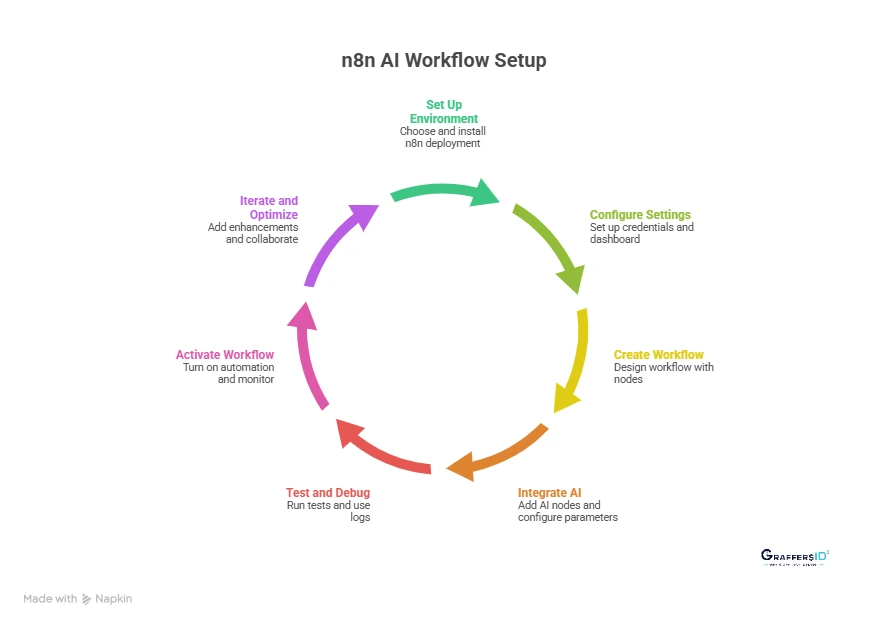
1. Set Up Your n8n Environment
- Choose Your Deployment Method: You can start with either n8n Cloud or a self-hosted deployment on your server, VPS, or container platform (Docker/Kubernetes). Self-hosting gives you full data control and compliance.
- Install n8n: If self-hosting, install n8n using Docker, npm, or cloud marketplace images. Confirm network access and ensure environment variables (API keys, secrets) are securely stored.
2. Configure Basic Workflow Settings
- Access the n8n Dashboard: Once installed, log in to the n8n web UI. This is your visual workspace where nodes are created, connected, and managed.
- Set Up Credentials: Before building automations, add credentials for services you’ll use (e.g., Slack, Google Sheets, CRM, AI models). n8n securely stores these and makes them reusable.
3. Create Your First Workflow
- Add a Trigger Node: Start by selecting a trigger node, such as a webhook, schedule, or event listener. This defines how your workflow starts (e.g., a new form submission or a timer).
- Build the Workflow Sequence: Drag and drop nodes to define each step, API calls, data transforms, conditional logic, loops, and more. This visual canvas makes workflow logic easy to follow.
4. Integrate AI Into Your Workflow
- Add an AI Node: Choose a node that connects to your AI provider (OpenAI, Claude, Gemini, etc.). This enables calls to language models for text generation, classification, summarization, and more.
- Configure Model Parameters: Specify the AI model, prompt structure, temperature, and output fields. This lets you tailor AI behavior for tasks like summarizing text, generating responses, or classifying data.
5. Test and Debug Your Workflow
- Run Manual Tests: Before automating live data, test your workflow with sample inputs. This ensures each node runs correctly and the AI node produces expected outputs.
- Use Debug Logs: n8n provides logs and execution history so you can inspect inputs, outputs, errors, and performance. Troubleshoot issues before going live.
6. Activate Your Workflow
- Turn On Automation: After testing, activate the workflow. n8n will now run it automatically based on the trigger conditions.
- Monitor Executions: Use the n8n dashboard to monitor workflows, review executions, and gain insights on performance and errors in real time.
7. Iterate and Optimize
- Add Enhancements: As your needs evolve, add error handlers, branching logic, retries, or additional integrations. n8n’s modular architecture makes workflows adaptable.
- Version Control & Collaboration: Export workflows to code, commit to git, and use CI/CD tools to collaborate and manage releases, just like software engineering workflows.
In brief, to start using n8n and build AI workflows, install and configure the platform, connect services and AI models, design your automation visually, test thoroughly, and activate the workflow for production automation.
Final Verdict: Should Your Enterprise Use n8n in 2026?
In 2026, automation is no longer a back-office efficiency tool; it is a strategic growth engine. Modern enterprises must:
- Integrate AI directly into business operations
- Eliminate repetitive manual workflows
- Prevent SaaS automation costs from scaling uncontrollably
- Maintain full data ownership and compliance
- Orchestrate systems, teams, and AI agents intelligently
This is where n8n stands out. For CTOs and product teams prioritizing scalability, infrastructure control, AI integration, and long-term cost efficiency, n8n is a smart choice in 2026.
At GraffersID, we help startups and enterprises design and implement AI-powered workflow automations, custom AI agent systems, scalable backend integrations, and secure, self-hosted automation infrastructure.
Hire expert AI developers from GraffersID today to build intelligent automation that scales with your growth.