Guick Takeaways
- 65% of SaaS vendors are integrating generative AI features in 2026, according to IDC. If your product has no AI layer, your competitors already have an advantage.
- The most impactful AI features are not the most complex ones. An AI copilot, a RAG-powered search, or a smart summary feature can transform user retention faster than a full model training pipeline.
- LLM API costs have dropped 98% since 2022. The barrier to adding AI is no longer cost. It is knowing where to start and which problems actually need AI.
- The biggest mistake SaaS teams make with AI is adding features that look impressive in demos but add no value to the core workflow. Build AI that resolves work, not AI that performs tricks.
Most SaaS CTOs are not asking whether to add AI anymore. They are asking what to add, where to start, and how to do it without breaking what they have already built. Those are harder questions than they look, and the answers vary depending on what your product does and who uses it.
Adding AI to a SaaS product in 2026 is not about slapping a chatbot on your dashboard and calling it an AI feature. It is about identifying the workflow your users repeat every day and making it significantly faster, smarter, or more automated. Done right, agentic AI in software development changes the ceiling of what your product can deliver. Done wrong, it adds infrastructure cost with no retention benefit.
This guide gives you a practical framework: which AI features actually move the needle, how to integrate them without overengineering, what the real costs look like, and who should build them.
The Difference Between AI-Added and AI-Native SaaS
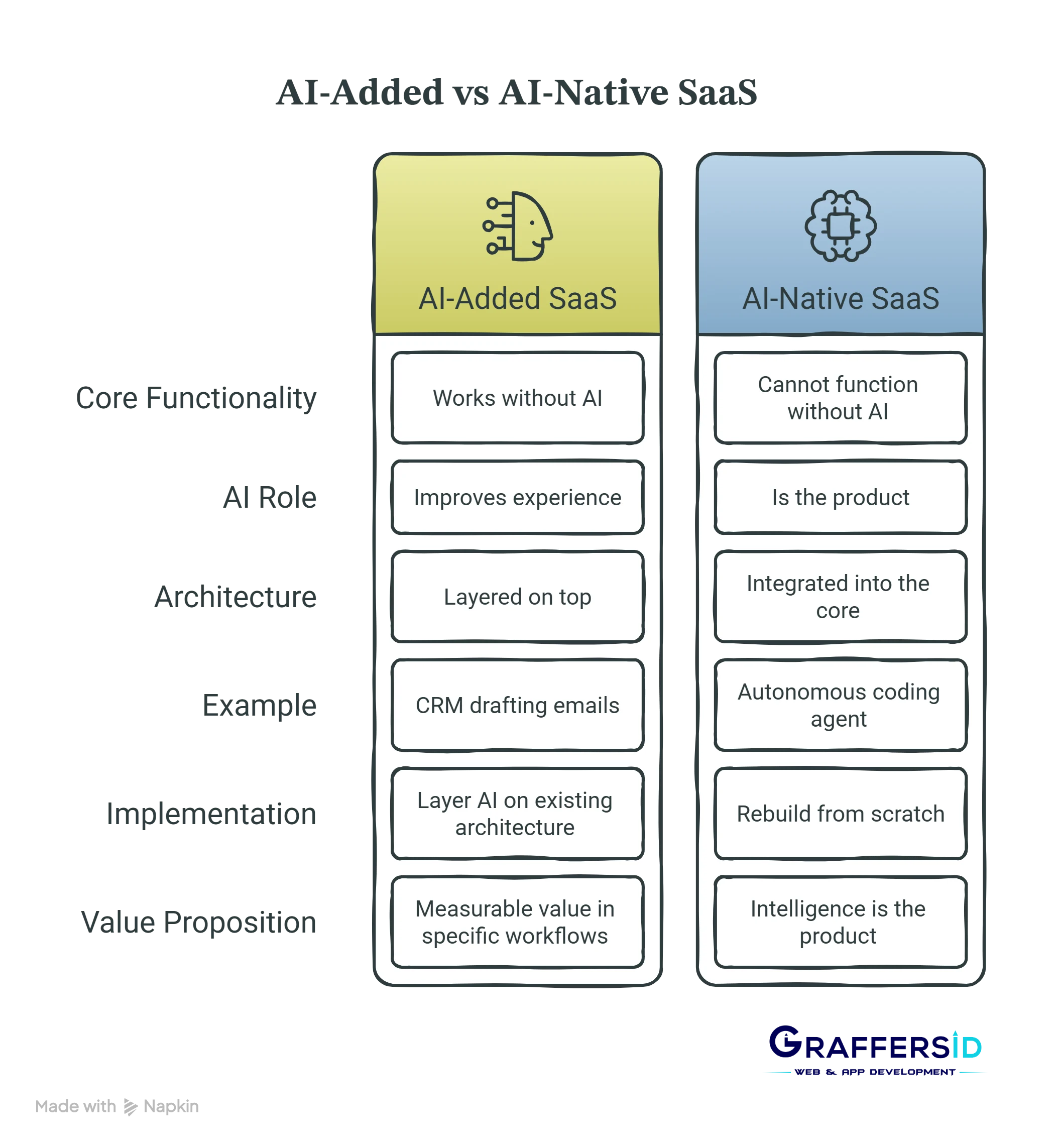
Before you decide what to build, it is worth being clear on what category your product belongs to, because the answer changes everything about your integration approach.
- An AI-added SaaS product is one where the core product works without AI, but AI makes it better. Think of a project management tool that uses AI to generate task summaries, or an analytics dashboard that adds a natural language query layer on top of existing data. Spotify is a useful reference point: the product works without recommendations, but the AI layer makes it significantly better. These products retain conventional software architecture at their core and layer AI capabilities on top.
- An AI-native SaaS product cannot function without AI. The intelligence is the product. Remove the model and nothing useful remains. Examples include autonomous coding agents, AI-driven diagnostic tools, and generative design platforms.
- Most established SaaS products in 2026 are in the first category, and that is a perfectly strong position. You do not need to rebuild your architecture from scratch. You need to identify two or three workflows where AI would deliver a measurable improvement to your users and integrate those specifically.
Which AI Features Actually Matter to SaaS Users?
Not every AI feature delivers the same value. The ones that consistently show up in retention and engagement data across SaaS products in 2026 fall into four categories.
-
AI Copilot and Inline Assistance
An AI copilot lives inside the user’s primary workflow and helps them do the current task faster. This is the highest-impact feature for most SaaS products because it reduces friction in the core action your users take every day. In a CRM, it drafts the next email and in a document tool, it rewrites the selected paragraph. In a code editor, it suggests the next function.
The technical implementation starts with a well-engineered integration with an LLM API, such as OpenAI, Anthropic, or Google Vertex AI, combined with careful prompt engineering that gives the model the right context from the user’s current state. How LLM agents work in production systems gives a clear view of the architecture that makes these systems reliable rather than brittle.
-
RAG-Powered Search and Q&A
Retrieval-Augmented Generation lets your SaaS product answer questions using your users’ own data, not just the model’s training knowledge. A user asks “what did the last three clients say about the onboarding experience?” and the system retrieves the relevant records, summarizes them, and returns a grounded answer instead of a hallucinated one.
This is the feature that matters most for knowledge-heavy SaaS products: help desks, legal tools, HR platforms, and B2B analytics products. What retrieval-augmented generation actually involves is worth reading before you commit to a RAG architecture, because the implementation decisions you make in week one determine how well it scales.
-
AI-Powered Summarization and Reporting
The amount of data inside most SaaS products far exceeds what users can realistically read. AI summarization takes long documents, conversation threads, call transcripts, or data exports and produces a plain-language summary or action-item list in seconds. For productivity, CRM, and communication tools, this is often the feature with the fastest time-to-value because users see the benefit immediately without needing to change their behaviour.
-
Predictive and Proactive Alerts
Instead of waiting for users to notice a problem, AI can surface it proactively. A churn risk score that flags customers likely to cancel. An anomaly in spend data flagged before the end of month review. A pipeline deal that has gone silent for fourteen days. These features move your product from reactive tool to proactive system, and that shift dramatically increases how much users depend on it.
Read Also: How to Build an AI Agent in 2026: Architecture, Use Cases, and Enterprise Best Practices
RAG vs Fine-Tuning vs Prompt Engineering: Which Approach Is Right?
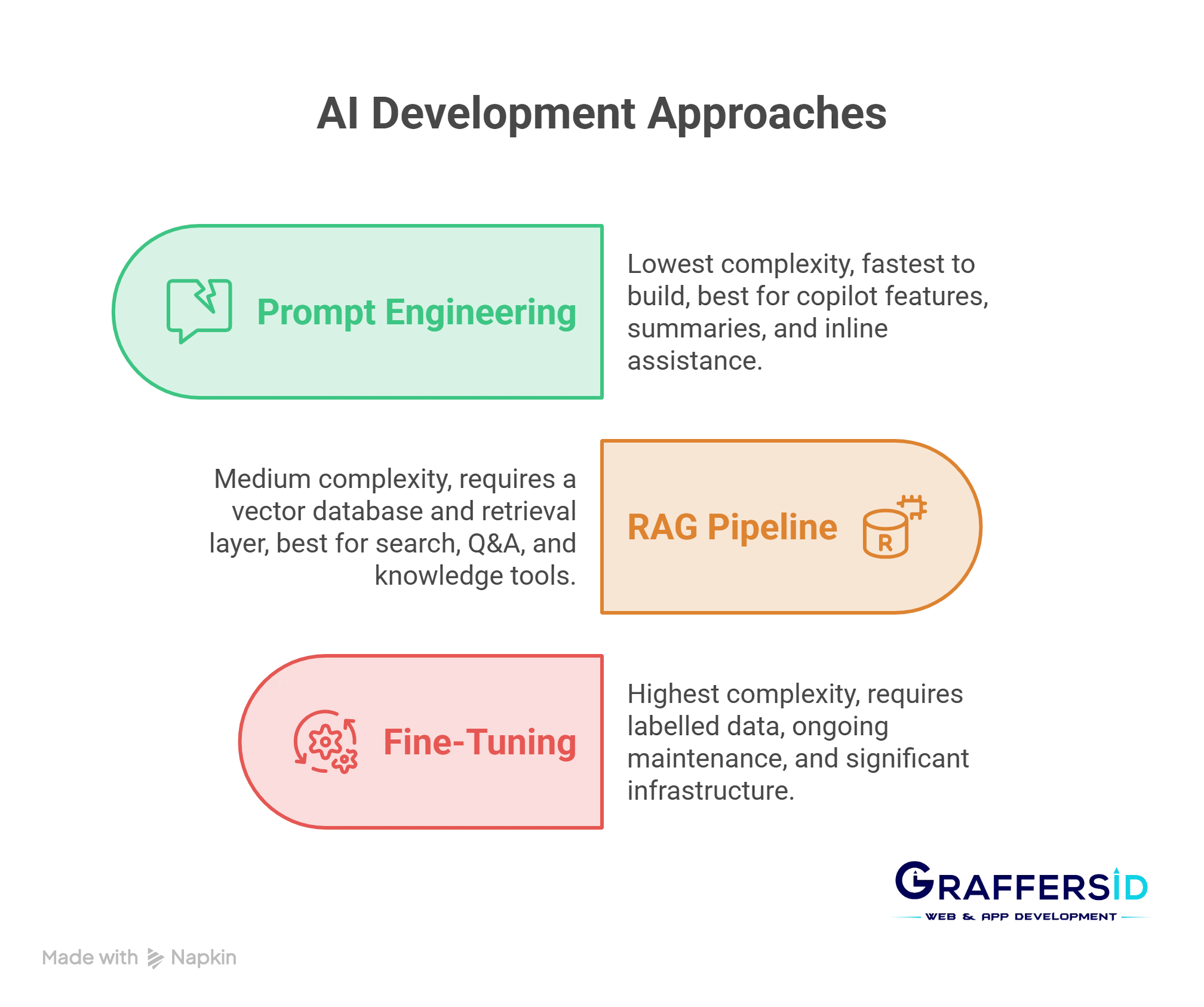
One of the most common decisions a CTO faces when adding AI features is which integration approach to use. The options sit on a spectrum from simple to complex, and the right answer depends on your use case, not your ambition level.
1. Start with Prompt Engineering
For most AI features, a well-designed system prompt with the right context injected at runtime is enough to get excellent results. This is the cheapest, fastest, and most maintainable approach. You call an LLM API, pass it the user’s current context alongside a carefully constructed prompt, and return the result. No vector database, no training pipeline, no infrastructure beyond what you already have.
If your feature can be built with prompt engineering, build it that way first. Measure the output quality. Only introduce additional complexity when you have evidence that simpler approaches are not sufficient.
2. Add RAG When Users Need to Query Their Own Data
Prompt engineering works when the context fits within the model’s context window. When users need to search across thousands of documents, conversation histories, or proprietary records, you need a RAG pipeline. The architecture involves chunking your data, generating embeddings, storing them in a vector database such as Pinecone or pgvector, retrieving the relevant chunks at query time, and passing them to the model as context.
How LangChain fits into an AI development stack is directly relevant here. LangChain and LangGraph are the most widely used frameworks for building production RAG pipelines in 2026. They handle the orchestration layer so your team does not have to build it from scratch.
3. Fine-Tune Only When You Have Proprietary Behaviour to Teach
Fine-tuning a model on your own data makes sense when you have a high-volume, repetitive task where the base model’s general behaviour is consistently wrong for your domain. A legal SaaS that needs clause extraction in a very specific format. A healthcare tool that needs to classify clinical notes against a proprietary taxonomy. These are real fine-tuning use cases.
For most SaaS products, fine-tuning is premature. It requires good labelled data, ongoing maintenance as models update, and significantly higher infrastructure investment. Build the prompt-engineered version first, measure where it fails, and only then consider whether fine-tuning would fix those specific failures.
The Architecture Decisions You Must Get Right Before You Build
Adding AI features to an existing SaaS product is not just an ML problem. It is a software architecture problem. The decisions you make early determine how reliable, scalable, and maintainable your AI layer is six months later.
1. Isolate Your AI Layer as a Separate Service
Do not tightly couple your AI features to your core application logic. Build them as independent services that your main application calls. This gives you the ability to swap models, update prompts, and iterate on AI behaviour without touching the rest of your codebase. It also makes it easier to monitor, rate-limit, and control inference costs.
Choosing the right AI tech stack for web development covers the infrastructure decisions around model serving, vector databases, and observability tools that sit beneath this service layer.
2. Build a Feedback Loop From Day One
Log every AI interaction your users have. Log the input, the output, and whether the user accepted, edited, or rejected the result. This data is your competitive moat. It tells you where the model is performing well, where it is failing, and what your users actually need from the feature. Without it, you are iterating blind.
Teams that build this feedback loop from the start consistently ship better AI features in the second iteration than teams that add logging as an afterthought three months later.
3. Control Your Inference Costs From the Start
LLM API costs have dropped dramatically, but they still scale linearly with usage. An AI feature that costs $50 a month at 100 users can cost $50,000 a month at 100,000 users if it is poorly designed. Implement per-user rate limits, cache common responses where appropriate, and choose the smallest model that achieves the output quality you need. Use a larger model for complex tasks and a smaller, faster model for high-volume simple ones.
Understanding how large language models work and which model fits which use case helps you make these cost decisions with confidence rather than defaulting to the most powerful option for every feature.
Read Also: How to Build a Successful AI Adoption Strategy in 2026: A Proven Framework for CEOs and CTOs
What Does It Actually Cost to Add AI Features to a SaaS Product in 2026?
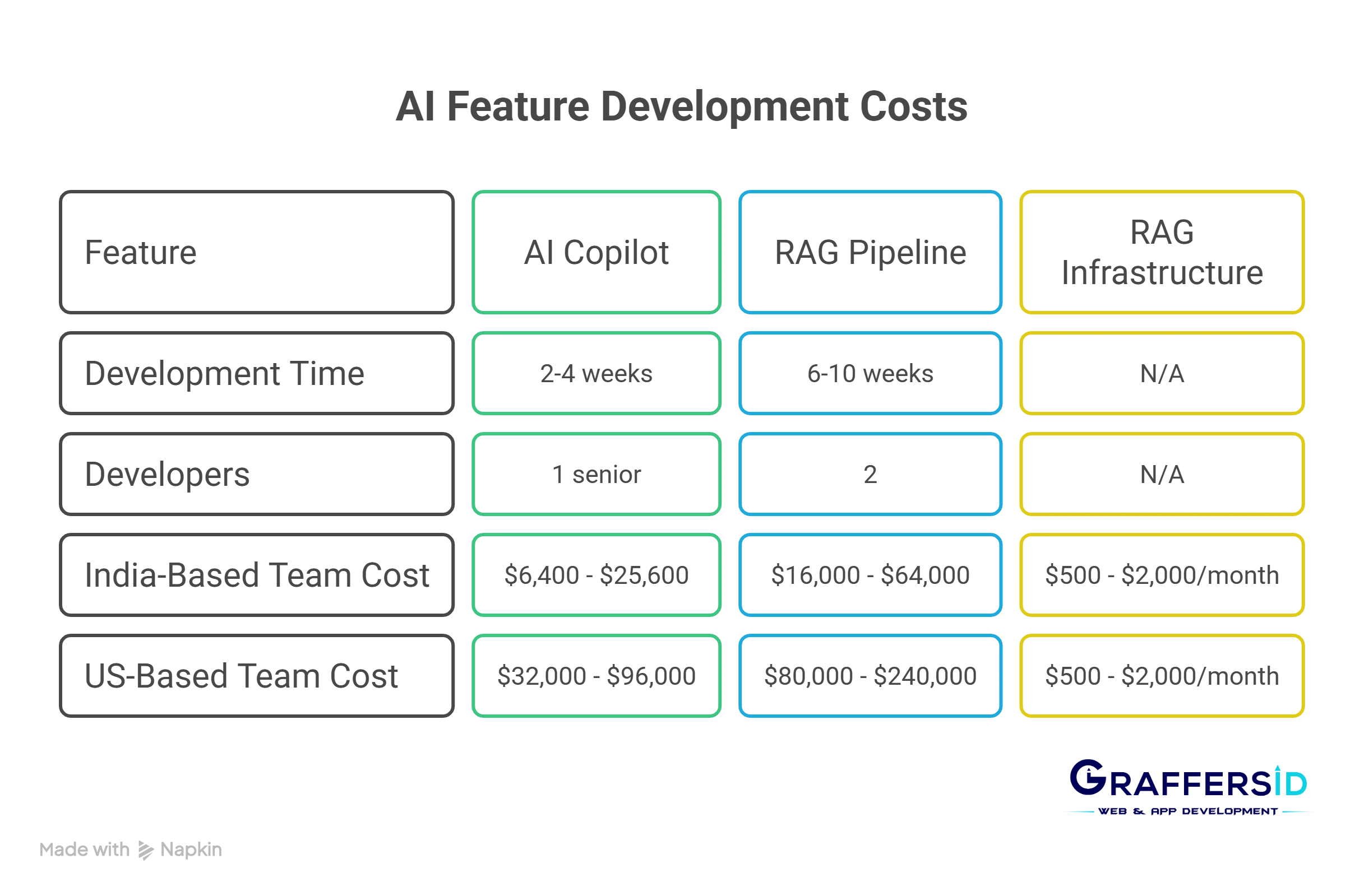
The cost answer depends entirely on what you are building, but the ranges in 2026 are more accessible than most CTOs expect.
A simple AI copilot feature built on top of an LLM API, with prompt engineering and basic rate limiting, typically takes one senior developer two to four weeks to ship to production. At GraffersID’s India-based rates of $20 to $40 per hour, that is $6,400 to $25,600. At US rates of $100 to $150 per hour, the same feature costs $32,000 to $96,000. The output is identical.
A full RAG pipeline with document ingestion, vector storage, retrieval orchestration, and a polished user interface takes longer. Expect six to ten weeks of development with a two-person team. The recurring infrastructure cost for a production RAG system serving a few thousand users starts at around $500 to $2,000 per month, covering vector database hosting and LLM API inference.
Agentic features, where the AI can take multi-step actions inside your product, require more architectural investment. How compound AI systems are structured in production gives you a clear view of what the engineering involves before you scope this kind of work.
Should You Build In-House or Bring In AI Specialists?
Most SaaS engineering teams in 2026 are excellent at building the product. They understand the domain, the users, and the codebase. What they often lack is deep experience with LLM integration patterns, RAG architecture, prompt reliability, and inference cost optimisation. These are genuinely different skills from standard full-stack development.
The fastest path for most teams is to bring in two or three AI-proficient developers who have built these systems in production before, embed them in your existing team, and build the first AI feature alongside your engineers. The knowledge transfer that happens during that build is worth as much as the feature itself.
This is where staff augmentation makes clear sense. You get the specific AI skills you need, in weeks rather than months, without the overhead of a full-time hire or the loss of control that comes with handing the work to an agency.
At GraffersID, our AI developers have hands-on experience with LLM integration, RAG pipelines, LangChain orchestration, and production agent workflows. They embed in your team, work to your processes, and can typically start within 48 hours. Hire AI developers from GraffersID if you want the feature built right the first time rather than rebuilt six months later.
The Features That Look Good in Demos but Do Not Survive in Production
A practical guide on this topic would not be complete without the honest section. Several AI features are popular in product announcements and rarely deliver sustainable value to end users.
The pure chatbot that is not grounded in your product’s data is the most common example. Users ask questions, the model answers from its general training knowledge, and users quickly discover it cannot actually access their information. Without a proper RAG layer, a chatbot is a liability, not a feature.
The AI that automates a workflow users do not actually do often. AI saves the most time on high-frequency, repetitive tasks. If your product has a workflow that users complete once a month, automating it with AI will not move your engagement metrics. Pick the daily or weekly workflows first.
The fully autonomous agent launched before the reliability bar is met. LLM agents are genuinely powerful, but agents that take irreversible actions without human confirmation create a trust problem the moment they make a mistake. Start with agents that suggest and draft, not agents that execute and submit. Add automation progressively as your users build trust in the system’s accuracy.
Understanding the difference between agentic AI and AI agents matters here because the two require very different reliability standards before you can hand them real user workflows.
Final Thoughts
Adding AI to your SaaS product in 2026 is not optional if your market is competitive. But the way you add it matters far more than how quickly you ship the first feature. The CTOs who get this right start with the workflow that matters most to their users, build the simplest version that genuinely works, instrument it properly, and iterate from real usage data.
The ones who get it wrong pick the most impressive-sounding feature, over-engineer the integration, skip the feedback loop, and end up with expensive infrastructure supporting a feature their users rarely touch.
Pick one workflow. Build it properly. Measure everything. Then expand.
If you need experienced AI developers who have built these systems in production and can move fast without cutting corners on reliability, talk to the GraffersID team. We place pre-vetted AI developers from India who are ready to start within 48 hours.